Last Updated: Oct 2026
Best Web Hosting Services of 2026
- 1. Compare
- 2. Register
- 3. Launch Your Site








Website hosting services provide the online space and technology your website needs to be visible on the internet. In simple terms, web hosting stores your site's files and delivers them to visitors whenever they enter your domain name. A reliable hosting provider keeps your site fast, secure, and available around the clock.
Choosing the right plan starts with understanding your website's purpose, expected traffic, and how comfortable you are with technical setup. Clarifying these needs early helps avoid overpaying or selecting a service that won't scale as the site grows. Beginners often appreciate hosts with intuitive dashboards, while more advanced users prefer the flexibility of full server environments.
Modern internet hosting is no longer just about disk space. The best providers rely on NVMe storage, global content delivery networks, and server-level caching. Hosting quality directly affects search rankings, conversion rates, and customer trust.
Choosing the best internet hosting provider starts with knowing what you need from a web hosting platform and how those features support your goals.
Identify your website type and match it to what matters most. Blogs should prioritize ease of use and speed, small businesses need strong uptime and security, ecommerce sites require reliable backups and consistent performance, and developers benefit from scalability and flexibility.
Consider current and projected traffic, including campaigns or seasonal spikes. Choose hosts that show clear resource limits (CPU, RAM, concurrent processes), offer auto-scaling or easy upgrades to VPS/cloud plans, and provide straightforward migration tools.
Beginners should look for managed environments with easy dashboards, automatic updates, guided setup, and responsive human support, often enhanced with AI assistants for basic troubleshooting.
Technical users may prefer full server access, SSH, custom stacks, and infrastructure-level control on VPS or cloud platforms. The right hosting platform should match your technical comfort level today while still supporting more advanced workflows as your site grows.
Fast load times and 99%+ uptime are crucial for user experience and SEO. Look for modern infrastructure like NVMe storage, LiteSpeed or Nginx servers, integrated CDN, and object caching. The web hosting market analysis from Elementor shows 47% of users expect sub-two-second load times.
Compare both introductory and renewal rates to understand long-term costs, and check how pricing changes for monthly vs multi-year terms. Review what’s included or extra for backups, malware removal, priority support, and email hosting, since these add-ons can significantly change the real cost.
This is especially important if professional communication matters to your business, as bundled email limits and paid upgrades can make a major difference when comparing the best email hosting sites versus basic hosting plans.
Reliable support simplifies setup and troubleshooting, especially during outages or migrations. Consider whether support is 24/7, how quickly they respond and resolve tickets, and whether complex issues can reach knowledgeable humans rather than stopping at basic AI chat.
Features like website builders, one-click installs, automatic core and plugin updates with rollback, and visual backup/restore make ongoing management easier. Staging or dev/staging/production environments and a clean, intuitive control panel can save significant time over the life of the site.
Plans should include SSL, basic WAF, DDoS protection, malware scanning, and regular automated backups. Consider hosts that provide automated security patching, login/brute-force protection, and clear terms for malware cleanup and incident response.
Choose providers with straightforward upgrade paths, vertical and/or horizontal scaling options, and free or low-friction site transfers. Confirm backup frequency, retention period, and how quickly your site can be restored when something goes wrong.
Look beyond starting prices to compare performance, support quality, included features, and expected downtime costs. Factor in data center location and CDN coverage for your audience, green/eco hosting commitments, and any compliance or data-residency needs that might justify paying more for the right infrastructure.
Understanding the main types of hosting helps you decide which approach best matches your needs.
Shared hosting is often the simplest and most affordable option. It's ideal for beginners, small personal sites, or early-stage businesses.
Many users choose shared hosting because it's easy to manage and doesn't require technical skills. According to Hostinger's 2025 industry analysis, shared hosting powers more than 18.5 million websites worldwide, with the market projected to reach $70.6 billion by 2026.
VPS hosting provides more predictable performance and dedicated resources. It's a popular step up for those who outgrow shared hosting but don't need a dedicated server. The VPS market is expected to reach approximately $6.4 billion by 2026, growing at a compound annual growth rate of 11.9%.
Dedicated hosting is designed for large, high-traffic websites or businesses with specialized requirements. It offers full control over server performance and configuration. The dedicated server hosting market is forecasted to grow to $29.6 billion by 2026, reflecting strong demand from enterprises and high-traffic platforms.
WordPress hosting provides an optimized environment specifically for WordPress sites. It's well-suited to bloggers and small business owners who want strong performance with minimal management. WordPress powers 43.5% of all websites, making specialized WordPress hosting a critical segment of the industry.
Cloud hosting offers scalable, flexible resources and is favored by more technical or cost-conscious users. It's often recommended for developers who want more control without the expense of dedicated hardware. The major cloud providers (AWS, Microsoft Azure, and Google Cloud) together hold approximately 80% of the global cloud infrastructure market.
Pro tip: Upgrade from shared hosting when traffic exceeds 20,000-30,000 monthly visits. Cloud hosting suits fluctuating traffic, while dedicated hosting handles compliance and performance isolation. Hybrid cloud-VPS solutions offer a growing middle ground.
Use this table as a quick overview of how major site hosts position themselves; always check each host’s site for the latest features and pricing, as offerings can change frequently.
Provider | Best Website Type | Ease of Use | Key Features | Support Quality | Scalability |
|---|---|---|---|---|---|
Bluehost | Blogs, first WordPress sites | Very easy | Guided WordPress setup, free SSL, basic CDN | Strong, beginner-friendly | Moderate |
Hostinger | Blogs, small businesses, creators | Easy | Fast servers, built-in caching, custom control panel | Good (24/7 chat) | Strong |
IONOS | Small businesses | Moderate | Business-focused hosting, strong uptime, security tools | Good, professional | Very strong |
GoDaddy | Simple business sites, domains | Easy | Domain + hosting bundles, website builder | Strong phone support | Limited |
HostGator | Simple small–mid websites | Easy | cPanel hosting, one-click installs | Good | Moderate |
Namecheap | Personal sites, budget projects | Easy | Low-cost domains, simple hosting plans | Basic | Limited |
WordPress.com | Content sites, bloggers | Very easy | Fully managed WordPress, automatic updates | Strong | Limited |
Hosting.com | Basic personal websites | Easy | Standard shared hosting, basic tools | Basic | Limited |
Network Solutions | Established businesses | Moderate | Bundled business services, legacy tools | Basic | Limited |
Web hosting pricing usually follows a two-phase model: a lower introductory price for new customers and a higher renewal price once the initial term ends.
For entry-level plans, introductory hosting prices typically range from $3–$15 per month when you commit to a longer billing term. After that first term, renewal prices commonly increase to about $8–$40+ per month, depending on the hosting type, included features, and support level.
Most personal websites, blogs, and small business sites fall comfortably within these ranges. As traffic, performance needs, or security requirements grow, costs increase accordingly.
Because many providers highlight promotional pricing, the most important comparison is not the starting price—but what the plan costs long term and what’s included at renewal.
Choosing a plan that fits your current needs while offering simple upgrade paths helps control costs and avoids unnecessary migrations as your site grows.
The ranges below reflect common long-term pricing patterns, not short-term promotions:
Shared hosting: $3–$15 intro, usually renewing at $8–$25+
Best for small websites, blogs, and early-stage businesses.
Managed WordPress hosting: $10–$40 per month
Includes performance optimization, updates, backups, and support.
VPS hosting: $15–$60+ per month
Provides dedicated resources and more control for growing sites.
Cloud hosting: $10–$100+ per month (usage-based)
Designed for scalability and variable traffic.
Dedicated hosting: $80–$300+ per month
Built for high-traffic, compliance-driven, or performance-critical sites.
Actual pricing varies based on resource limits, traffic levels, security features, and support tiers.
Expect to pay $3–$15 per month to start, and $8–$40+ per month long term for reliable web hosting—more if your site requires higher performance or advanced features.
Several factors shape how much you’ll pay for hosting over time. Understanding the main cost drivers helps you avoid overpaying or choosing a plan that doesn’t scale.
Hosting type
Shared hosting is the cheapest option, while VPS, cloud, and dedicated hosting cost more as you gain performance, isolation, and control. More resources and customization generally mean higher monthly fees.
Resources and traffic
Storage, bandwidth, and traffic levels directly affect pricing. Sites with large media files or traffic spikes typically need higher limits, which increases cost—especially on shared plans with soft caps.
Number of websites
Plans that allow multiple sites or domains cost more because they consume additional resources. Entry-level plans often limit you to a single site.
Support level
Basic support is usually included, but priority or advanced technical support often comes with higher-tier plans. Faster response times can justify the extra cost when uptime matters.
Security and backups
Features like malware scanning, DDoS protection, and automated backups may be bundled or sold as add-ons. Hosts that include these upfront often cost more but reduce risk and surprise fees.
Advanced features and overages
As sites grow, add-ons and limits often drive unexpected increases. Common examples include CDN overage when traffic exceeds included thresholds, limited backup retention that requires paid extensions, restricted email storage that forces upgrades, and staging environments that may cost extra despite being critical for safe updates.
Pro tip: Rather than stacking add-ons on the cheapest plan, a well-priced mid-tier plan often delivers better long-term value with fewer hidden costs.
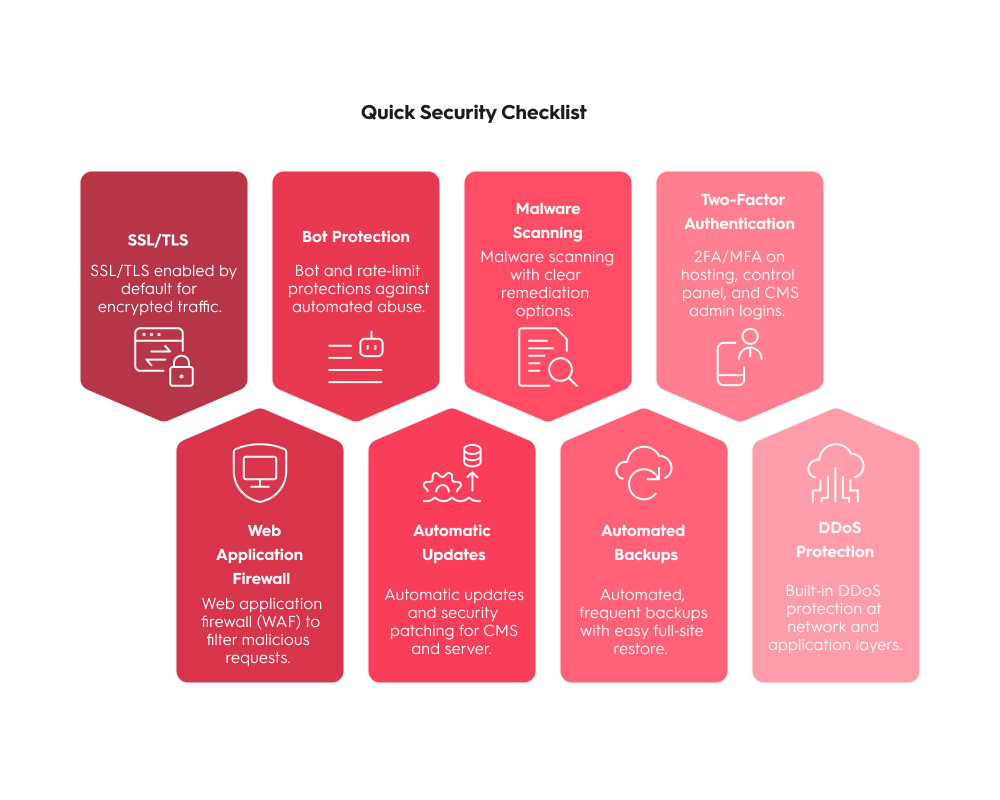
Security is a core hosting requirement, not an optional upgrade. The most reliable hosting providers combine multiple security layers that work automatically, without requiring constant manual intervention.
SSL encryption
SSL/TLS encrypts data between your site and visitors, enables HTTPS, and supports trust and search visibility. Most reputable hosts now include at least one free SSL certificate by default.
Web application firewall (WAF)
A WAF filters malicious traffic before it reaches your site, blocking common attacks like SQL injection and cross-site scripting. It’s a baseline requirement for business and ecommerce sites.
Bot and abuse protection
Automated bots drive a large share of credential attacks, scraping, and low-level DDoS attempts. Built-in bot filtering and rate limiting help protect both security and performance.
Automatic updates and patching
Outdated CMS software and plugins remain a leading cause of breaches. Hosts that support automatic updates and server-level patching reduce exposure without relying on manual upkeep.
Malware scanning and cleanup
Regular malware scans help detect compromises early. The most valuable plans include remediation or guided cleanup, not just alerts.
Automated backups with easy restore
Frequent, off-site backups protect against hacks, failed updates, and human error. One-click restore is essential for fast recovery.
DDoS protection
Modern hosts combine network-level and application-layer DDoS mitigation to keep sites online during traffic floods and attack attempts.
Strong access controls
Two-factor authentication and modern access controls help prevent account takeovers and reduce risk from compromised credentials.
When these features work together, they form a layered security model that significantly lowers risk while keeping day-to-day management simple.
Beyond benchmarks and feature lists, real-world experience often reveals what actually matters once a site is live. Ongoing discussions on Reddit surface a few recurring themes that help explain why people stay with—or leave—a hosting provider.
Renewal pricing is a frequent source of frustration
Many users point out that low introductory prices can hide much higher renewal rates. Over time, long-term cost tends to matter more than the initial discount, and unexpected price jumps are a common reason people switch hosts.
Support quality matters more than specs
Across many discussions, poor support during outages, security issues, or migrations is cited far more often than storage or bandwidth limits as the reason for leaving a provider. When something breaks, fast access to knowledgeable help becomes critical.
“Unlimited” plans often come with practical limits
Users regularly mention hidden constraints such as inode caps, CPU throttling, or fair-use bandwidth policies, especially on shared hosting. These limits usually only become visible once a site starts to grow.
Migration experience shapes overall satisfaction
Many hosting changes happen under pressure—after a site failure, hack, or performance issue. Providers that offer clear migration guidance, free transfers, and easy rollback options tend to be viewed more favorably.
The best hosting depends on how you work
Community feedback consistently reinforces that there’s no single “best” host for everyone. Beginners often prefer managed hosting with simple dashboards and automatic updates, while developers lean toward VPS or cloud hosting with predictable resources and full server access.
At Top10.com, we recognize the importance of thorough and accurate product and service reviews in guiding your choices. Our team, comprising editors and industry experts, conducts extensive research to provide comprehensive insights. Our content is continually updated to reflect the latest market trends, offering current information.
We provide a range of services including comparison lists and in-depth reviews, all tailored to meet your specific needs. Our goal is to empower you to make confident and informed choices.

We evaluated performance, reliability, scalability, security, and overall value to identify the best web hosting services. Our analysis combines technical benchmarks and real-world user experiences.
Performance and uptime: We measured uptime guarantees, page load speeds, and modern infrastructure (SSD storage, CDN support, optimized servers). Hosts were assessed on their ability to maintain fast, consistent performance.
Security and protection: We reviewed essential security features, including SSL certificates, malware scanning, firewalls, DDoS protection, automated updates, and strong security policies.
Scalability and flexibility: We examined how easily providers allow resource upgrades, multiple websites, and transitions between hosting types (shared, VPS, cloud, dedicated).
Support and user experience: We evaluated 24/7 support availability, response quality, dashboard usability, one-click installations, and helpful knowledge bases.
Features and technology: We reviewed website builders, email hosting, staging environments, automated backups, developer tools, and modern technology stacks.
Pricing and value: We compared introductory and renewal pricing, contract terms, bundled features, and overall long-term value to identify fair and transparent providers.
How does web hosting work?
Web hosting stores your website’s files on a server that’s connected to the internet and always on. When someone enters your domain, their browser sends a request to that server, which responds with your site’s files, often using caching systems to speed up delivery and improve reliability.
What is bandwidth in web hosting?
Bandwidth is the amount of data your site can transfer to visitors over a given time period. It does not directly limit how many people can visit, but it controls how much content you can serve during traffic spikes before things slow down or hit limits.
Does web hosting include a website builder?
Some plans bundle a website builder, while others only provide hosting. Built‑in builders can be convenient but may limit design flexibility and make it harder to move your site to another host later, so check portability and export options.
How do you test the speed of a web hosting server?
Use tools such as GTmetrix, Pingdom, PageSpeed Insights, or WebPageTest to measure load times, server response, and performance. Run tests from multiple locations and repeat them over time to get a realistic picture instead of relying on a single result.
How do you transfer web hosting from one company to another?
Back up your entire site, migrate your files and database (or use your new host’s migration service), then update your domain’s DNS to point to the new servers. Allow up to 48 hours for DNS changes to fully propagate worldwide and keep the old plan active until you’ve verified backups and confirmed the new site is working correctly.
What is the difference between SSD and NVMe hosting?
Both are solid-state storage, but NVMe uses a faster interface and delivers significantly higher throughput and lower latency than traditional SATA SSDs. That extra speed often improves database performance and page load times, especially on dynamic sites like WordPress or e-commerce.
Does hosting location matter?
Yes. The closer your server (or primary data center) is to your main audience, the lower the network latency and the faster pages usually feel. Using a CDN helps serve content closer to users globally, but origin location still matters for dynamic content and database queries.
Is free SSL enough for e-commerce?
Free SSL certificates (like domain‑validated TLS) provide strong encryption for most sites, including many small stores. Larger or higher‑risk ecommerce businesses may also need higher‑validation certificates, stricter PCI‑DSS compliance, and additional fraud and security controls beyond basic SSL.

1&1 IONOS offers a wide variety of hosting options ranging from shared and WordPress-optimized hosting to dedicated servers and VPNs.
Hostinger is a professional website hosting platform with all the right features. It has a limited basic plan that’s perfect for small or single-employee businesses looking for quality service for less. Customer support is friendly and available at all hours to help you when problems arise. At a low price, you really can’t go wrong. For more features, the more advanced plans offer plenty of bang for your buck.

Not too many people will fail to recognize the familiar friendly gator, the mascot of HostGator. The service is one of the most prevalent in the country, and it has the perks to keep customers coming back. HostGator kicks things off with a 45-day money-back guarantee, 24/7 live chat customer support, and a solid 99.9% uptime guarantee.