Last Updated: Apr 2026
Best Task Management Tools of 2026
Optimize team collaboration


.20210527084730.png)
 Free Trial
“The workflow management tools on Monday.com are as user-friendly as possible. “ (Jan 2026)
Free Trial“The workflow management tools on Monday.com are as user-friendly as possible. “ (Jan 2026)
Task management software is a digital solution designed to help individuals and teams plan, organize, and monitor their work with greater efficiency. At its core, task management involves overseeing tasks from ideation to completion, ensuring deadlines are met, responsibilities are clearly defined, and workflows remain streamlined. These platforms provide a centralized hub for creating tasks, assigning them, setting due dates, prioritizing workloads, and tracking progress. Many include calendar views, collaboration features, and built-in communication tools, replacing cluttered spreadsheets and disjointed email threads. The right task manager can help minimize confusion, increase transparency, and enhance productivity across entire teams.
This short video explains what really matters when comparing Task Management tools, key features to focus on, and how top options like monday.com and ClickUp stack up.

In 2026, as remote and hybrid work continue to shape the modern workplace, task management tools have become essential for keeping teams aligned and productive. With employees working across time zones and relying on asynchronous communication, businesses need tools that offer structure, visibility, and flexibility. Today’s platforms go beyond basic task lists; they now include AI-powered automation, wellness features like break reminders, and mobile-friendly interfaces that adapt to how teams actually work. These innovations reduce manual admin, support healthier work habits, and give managers real-time insight without micromanaging. Whether coordinating day-to-day tasks or complex projects, these tools help organizations stay organized, responsive, and efficient.
When comparing task management apps, consider these essential features:
These capabilities ensure that your team can scale operations while maintaining clarity and coordination across functions. 
AI features are reshaping task management by bringing predictive analytics, automation, and smart suggestions into daily workflows. Today’s top platforms use AI to:
This intelligence helps teams work proactively rather than reactively, reducing errors and boosting output.
Top task management tools in 2026 share core capabilities that support productivity, collaboration, and automation:
These features define the best task manager apps and help users stay organised, efficient, and aligned.
Avoiding these pitfalls ensures smoother implementation and long-term success with your chosen task management platform.
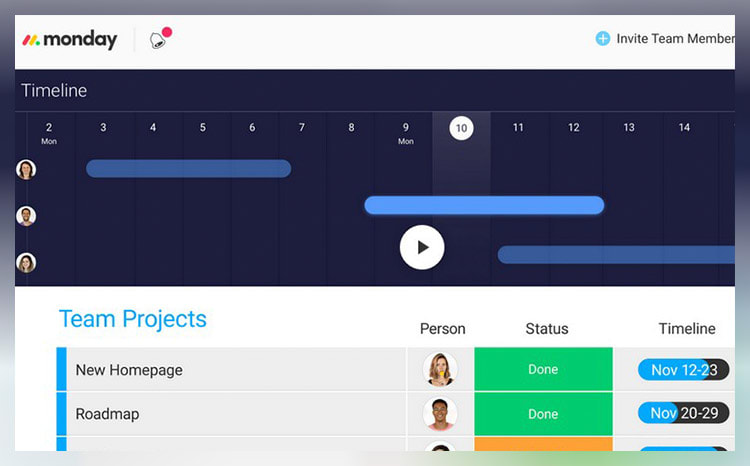
monday.com unifies your team’s tasks and processes into one user-friendly and visually pleasing interface.
As a work operating system, monday.com gives teams a clear view of responsibilities and deadlines, boosting transparency, accountability, and resource management. It features over 200 templates that can be customized with 20+ column options and various integrated apps. These tools simplify project setup and save time, helping you work more efficiently.
Additionally, you can tailor dashboards to provide detailed, team-specific views of tasks, project progression, and upcoming deadlines to enhance your team’s workflow clarity. Samyuktha Shivakumar, Global Marketing Operations Manager at Thoughtworks, reinforces this, stating that monday.com enables them “to budget the team’s time and efforts much more scientifically.”
Why we chose to review monday.com: monday.com tops our list for its combination of power, flexibility, and user-friendly design, making it ideal for even the most complex projects. It lets you seamlessly import data from spreadsheets and integrate it with your existing tools, eliminating manual data entry and freeing up time for other priorities.
Our experience: monday.com lets me implement processes that would’ve previously taken days or weeks within a few minutes. The platform’s communication tools, such as document sharing, comment annotation, and direct communication with task managers, improve collaboration within my team. The platform allows for excellent transparency for task management through easy-to-use sorting and color-coding methods.

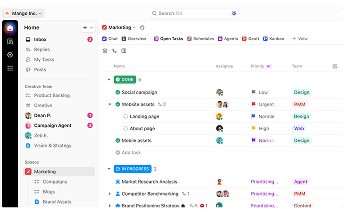
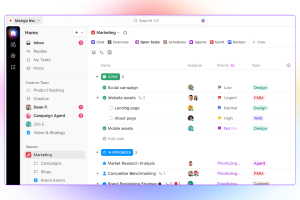
ClickUp stands out with its diverse visualization tools, including Gantt charts, mind maps, and Kanban boards, which suit various project management styles.
These features make it easy to track tasks, monitor progress, and identify challenges.
The "Timeline View" offers a clear, linear way to plan schedules and create visual roadmaps. You can group tasks by assignee, priority, tags, custom fields, and more, allowing for a flexible and organized workflow. ClickUp also boosts team visibility with the "Pulse ClickApp," which shows who's online and their current tasks. Its global timer lets you track time automatically or manually, syncing seamlessly with your desktop, mobile, or browser.
Why we chose to review ClickUp: What sets ClickUp apart is its seamless integration with over 1,000 other apps, including Slack, GitLab, GitHub, and Webhooks. This capability makes it a go-to choice for development teams, allowing them to streamline their existing workflows.
Our experience: While trying out ClickUp, I was particularly impressed with ClickUp’s unique features, such as notepads, time tracking software, goal-setting tools, and pre-made templates. I also liked that I could use slash commands (typing “/” in any text field to trigger a command menu) to assign tasks, set due dates, or create subtasks quicker.


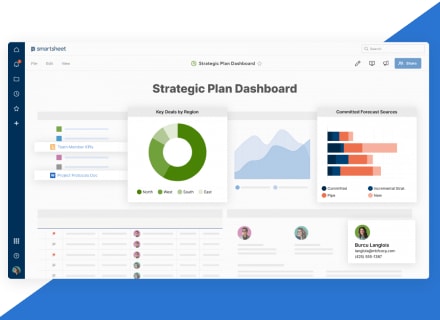
Smartsheet is a cloud-based work management platform that allows teams to manage dynamic work regardless of their location. With all data stored on the cloud and updated in real-time, you can track progress, identify potential issues early, and make data-driven decisions quickly.
This tool is also very user-friendly. A testament to Smartsheet’s ease of use comes from Janina Hill, Marketing Program Manager at WebEx, who notes, “Everybody has different levels of Smartsheet skills. But with drag and drop, all solutions are easy to use. Also, the workflow is much smoother when all processes are automated, and all information is in one place.”
This single-platform solution fosters interconnectivity across the entire organization, letting you share sheets with team members and effectively collaborate on projects. By centralizing data, it also reduces time spent on information management, boosting efficiency and enabling your team to focus on their primary responsibilities.
Why we chose Smartsheet: Smartsheet’s spreadsheet-like interface allows you to add new rows and columns as your project grows. This functionality can help you seamlessly expand small tasks into enterprise-wide initiatives. Additionally, its integration with apps like Slack, Teams, and Jira consolidates your data onto a single platform.
Our experience: Smartsheet allowed my team to strategically plan, implement, and monitor work on a large scale. This led to more streamlined processes, fostered innovation, and positively impacted overall business results within our own context. I found it invaluable in effectively navigating the complexities of today’s ever-changing work landscape.



.20210527085313.png)


