Last Updated: Oct 2026
1
Award Winning Service

.20210527084730.png)
monday.com
 Free Trial
Create a powerful, interactive online to do list for maximum efficiency
- Color coded labels to prioritize to do lists
- Modern, user-friendly interface
- Mobile to do list software for Android & iOS
- Effortlessly plan, organize & manage tasks
Forbeshighlights monday.com
“The workflow management tools on Monday.com are as user-friendly as possible. “ (Jan 2026)
9.8
Exceptional
.20210527085313.png)
Our Most Popular Pick
monday.com
Free TrialCreate a powerful, interactive online to do list for maximum efficiency
- Color coded labels to prioritize to do lists
- Modern, user-friendly interface
- Mobile to do list software for Android & iOS
- Effortlessly plan, organize & manage tasks
Forbeshighlights monday.com
“The workflow management tools on Monday.com are as user-friendly as possible. “ (Jan 2026)
9.8
Exceptional
What Is An Online To Do List?
Let’s be honest, not many people walk around with pencils and notepads anymore, but everyone walks around with their phones. So for people who need to keep track of their to do lists, an online to do list or app is the easiest, most convenient way. Whether you're managing your day or leading a team, using a free to do list can be a simple and cost-effective entry point into staying organized.
The need to stay organized is one that is felt by many, especially in today’s fast-paced environment in which people are often juggling work, family, and social lives all at the same time. Staying organized can help people feel calmer and more confident in tackling the many tasks they have. For businesses, an online to do list is essential in making sure that all team members are on the same page, that everyone knows which project is theirs and for overall tracking of progress. In fact, many startups and small businesses opt for a free to do list as a starting solution before scaling into paid project management tools.
Who Needs Shared To Do Lists?
Shared to do lists are a great tool for families and businesses. For families, shared to do lists can be a way of making sure that kids and spouses participate in family life and complete their household chores. Everyone knows what they’re responsible for, and they can happily mark that their task is completed once they do it. It’s motivational, encouraging, and most of all, practical. Some families find a free to do list to be a perfect introduction for kids to learn responsibility without needing to pay for software.
Shared to do lists for businesses can be the difference between a company that succeeds and a company that doesn’t. When you’re managing a team, it’s essential that everyone knows what they’re responsible for, can report on their progress, ask questions if necessary, and update the team when the task is completed. This is true for small businesses and larger businesses. A free to do list can also be a powerful temporary solution during onboarding or team trials before committing to a premium tool.
How to Choose The Best To Do List Software?
There are many different kinds of online to do lists, ranging from the most basic to the most comprehensive project management package. There’s not necessarily one solution that’s best, but there are lots of great solutions that cater to various needs. For example, if you need an online to do list to keep track of your personal affairs, you won’t choose one that has all the reporting and time tracking tools that small business might require. And large businesses may require features that a small business doesn’t need, such as scalable software, collaborative features, multiple communication tools, and more. However, for those just getting started, exploring a free to do list gives them a way to assess what functionalities they truly need without financial commitment.
On both the personal and business level, there are different options as well. People who need visual cues to help them stay organized should look for a solution that offers a visual online to do list, color coding, charts, or something in that vein. Company managers might look for a solution that includes an online to do list progress board so they can keep track of the team’s progress.
Of course, cost is another consideration when choosing an online to do list software. While personal to do list software typically don’t run too expensive, it’s still another monthly bill, so it needs to be worthwhile. Businesses are also careful about how they spend money, but it’s understood that an online to do list that increases productivity is worth the expense. (Of course, only the effective to do list software will do this.) Still, the solution will need to offer everything the business needs. This can include a to do list Windows program, an interactive to do list, a to do list with done dates, responsive customer support, integration with other apps, and overall ease of use. If you're trying to find a tool that balances quality with affordability, a free to do list might be the best option to trial first before committing to a subscription.
The bottom line is, since everyone has different needs, it’s important to choose the to do list software that caters specifically to you. Whether you begin with a free to do list or jump straight into a comprehensive suite, the goal is the same: better organization and greater productivity.
Our Top 3 Picks
- 1Exceptional9.8
 Efficient resource management tool
- Price - From $27/month ($9/user/month)
- Team collaboration tools - Collaborative docs, updates, Zoom integration, whiteboards
- Free trial - 14 days
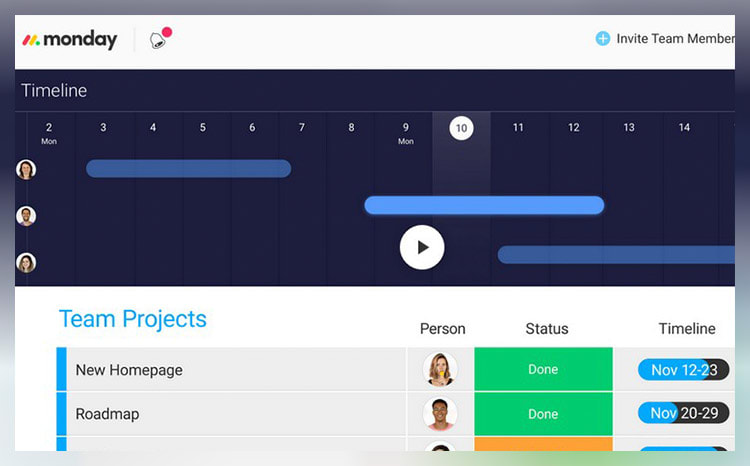
Efficient resource management toolRead monday.com Reviewmonday.com unifies your team’s tasks and processes into one user-friendly and visually pleasing interface.
As a work operating system, monday.com gives teams a clear view of responsibilities and deadlines, boosting transparency, accountability, and resource management. It features over 200 templates that can be customized with 20+ column options and various integrated apps. These tools simplify project setup and save time, helping you work more efficiently.
Additionally, you can tailor dashboards to provide detailed, team-specific views of tasks, project progression, and upcoming deadlines to enhance your team’s workflow clarity. Samyuktha Shivakumar, Global Marketing Operations Manager at Thoughtworks, reinforces this, stating that monday.com enables them “to budget the team’s time and efforts much more scientifically.”
Why we chose to review monday.com: monday.com tops our list for its combination of power, flexibility, and user-friendly design, making it ideal for even the most complex projects. It lets you seamlessly import data from spreadsheets and integrate it with your existing tools, eliminating manual data entry and freeing up time for other priorities.
Our experience: monday.com lets me implement processes that would’ve previously taken days or weeks within a few minutes. The platform’s communication tools, such as document sharing, comment annotation, and direct communication with task managers, improve collaboration within my team. The platform allows for excellent transparency for task management through easy-to-use sorting and color-coding methods.
monday.com Pros & Cons
PROS
Color-rich interface for improved organization and coordinationRobust list of supported, third-party integrationsDrag and drop project charting and timeline constructCONS
Pricing structure is fragmented and unclearCertain features (Gantt charts, timelines, etc.) are paywalled by higher-tier plans - 2
 Excellent9.3
 Visualize tasks and integrate apps
- Price - From $7/month/user
- Team collaboration tools - Collaborative docs, real-time chat, file sharing, proofing
- Free trial - Free plan available
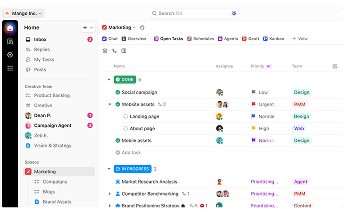
Visualize tasks and integrate appsRead ClickUp ReviewClickUp stands out with its diverse visualization tools, including Gantt charts, mind maps, and Kanban boards, which suit various project management styles.
These features make it easy to track tasks, monitor progress, and identify challenges.
The "Timeline View" offers a clear, linear way to plan schedules and create visual roadmaps. You can group tasks by assignee, priority, tags, custom fields, and more, allowing for a flexible and organized workflow. ClickUp also boosts team visibility with the "Pulse ClickApp," which shows who's online and their current tasks. Its global timer lets you track time automatically or manually, syncing seamlessly with your desktop, mobile, or browser.
Why we chose to review ClickUp: What sets ClickUp apart is its seamless integration with over 1,000 other apps, including Slack, GitLab, GitHub, and Webhooks. This capability makes it a go-to choice for development teams, allowing them to streamline their existing workflows.
Our experience: While trying out ClickUp, I was particularly impressed with ClickUp’s unique features, such as notepads, time tracking software, goal-setting tools, and pre-made templates. I also liked that I could use slash commands (typing “/” in any text field to trigger a command menu) to assign tasks, set due dates, or create subtasks quicker.
ClickUp Pros & Cons
PROS
AI CompatibleCan integrate with over 1,000 appsOffers numerous project tracking toolsCONS
Extensive feature list can be overwhelming for new usersSteep learning curve for beginners - 3
 Good8.3
 Includes pre-made to-do lists
- Price - From $50/month
- Team collaboration tools - Email integration, shared inbox, real-time chat, file sharing
- Free trial - Free plan available
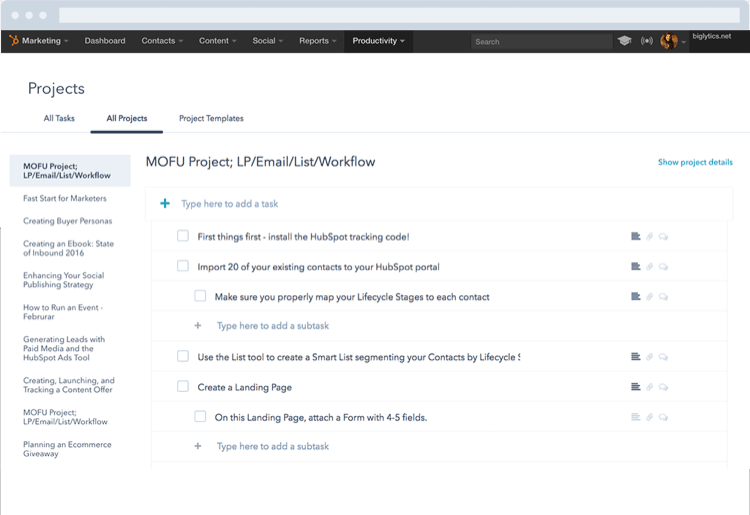
Includes pre-made to-do listsRead HubSpot ReviewYou can use HubSpot to enhance team coordination via structured lists. This platform lets you create and assign tasks, add subtasks, and set due dates from the same tab. You can also tag team members, leave comments and attach files inside projects for improved communication and collaboration.
While HubSpot may not have advanced tools like Gantt charts or detailed time-tracking, it provides a reliable foundation for managing tasks. For example, its real-time dashboard offers critical insights into project timelines, team workloads, and individual performance.
You can use this data during one-on-ones to identify potential hold-ups. It can also help you to delegate work more effectively. You can even tailor your dashboard view according to your team’s specific needs for a more personalized project management experience.
Why we chose HubSpot: This platform offers prebuilt project templates to help sales and marketing teams with tasks like launching sales campaigns and creating email newsletters. Each template comes with predefined action steps and best practice guidelines. These templates can save time and ensure everyone has clear instructions on what needs to be done.
Our experience: HubSpot’s features were easy to use and understand, even for our team members with limited technical know-how. Its seamless integration with HubSpot’s CRM also created a unified work environment for all our departments. Plus, being able to sync it with my calendar made it easy to know when to work on tasks and when to prepare for meetings.
HubSpot Pros & Cons
PROS
Customizable real-time dashboardOffers prebuilt project templatesIntegration with other HubSpot productsCONS
Smaller enterprises might find HubSpot's premium pricing costlyLacks more advanced project scheduling software



37,788 people
visited a to-do list software site this month

Top10.com Total Score
Our product scores consist of a combination of the following 3 components:
Popularity
Top10.com measures user engagement based on the number of clicks each listed brand received in the past 7 days. The number of clicks to each brand will be measured against other brands listed in the same query. Therefore, the higher the share of clicks a brand receives in any specific query, the higher the Click Trend Score. Top10.com accepts advertising compensation from companies, which impacts their (and/or their products’) position, and in some cases, may also affect their Click Trend Score.
Brand Reputation
Semrush is a trusted and comprehensive tool that offers insights about online visibility and performance. The Top10.com Total Score will consist of the brand's reputation from Semrush. The brand reputation is based on Semrush's analysis of clickstream data, which includes user behavior, search patterns, and engagement, to accurately measure each brand's prominence, credibility, and trustworthiness. If a brand does not have a Semrush score, the Top10.com Total Score will be based solely on the Click Trend Score and Products & Features Score (read below).
Features & Benefits
Top10.com editorial team researches and reviews financial products based on factors such as: range of products and services offered, ease-of-use, online accessibility, customer service, special awards, and more. Each brand is then given a score based on the offerings in each parameter. The specific parameters which we use to evaluate the score of each product can be found on its review page.
Smartsheet Alternatives: 5 Similar Options for Project and Task Management
Jun 23, 2026
Wrike Alternatives: 5 Best Project Management Software to Try in 2026
Dec 15, 2025
Asana Alternatives: 5 Best Project Management Software to Try in 2026
Dec 15, 2025


