267M Users Affected by Facebook Data Breach: Here’s How You Can Stay Protected
June 15, 2022
June 15, 2022
This devastating cyber breach could set up these users for further hacks and even risks exposing them to attempts at identity theft—being hacked substantially increases the chance of being targeted in follow-up attacks.
In light of these worrying developments, many users are asking themselves how to keep their data safe on the world’s most popular social network. Nobody wants to be caught out when the next breach happens.
Here are some tips which should allow you to continue enjoying Facebook—while keeping your personal data safe.
The first step to take in securing a Facebook account is to take control of your privacy settings. These can be accessed by clicking the bell icon toward the top right hand corner of the screen while logged in to Facebook and then clicking on the ‘Settings’ button.
By clicking ‘Privacy’ in the left side menu you’ll be able to access the main privacy settings for some information you have shared on Facebook.
Here you can:
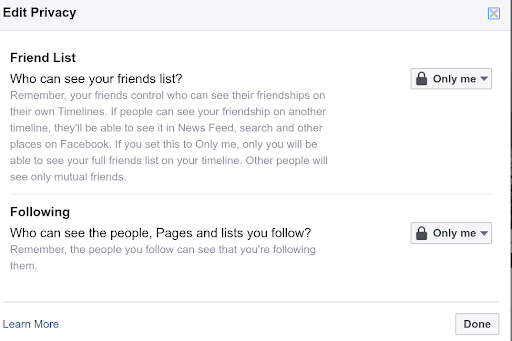
Unfortunately, Facebook’s privacy settings are not just limited to this page.
Any time you create a page or even fill out details in your personal profile you are feeding more data to the social networking giant. Clicking the ‘About’ tab in your profile, for instance, brings up an Overview screen for most users with tabs containing other information that you might have provided over the years.
By following prompts to ‘edit’ the details, users can also toggle the privacy settings applicable to that piece of information. These range from “Only Me”—which means that only the user can see the piece of information provided—to “Public”, which means that the entire world can, including those that do not have an active account on the site.
In order to control your privacy on Facebook, it’s important to use these very judiciously. Remember that the more pieces of information you make publicly accessible, the easier it’s going to be for a hacker to locate your other online profiles.
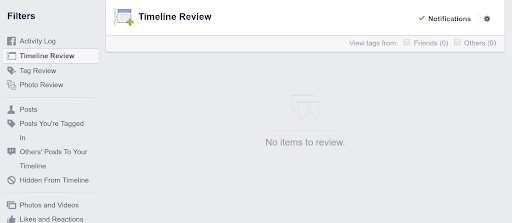
Although your password will never be publicly visible, hackers can use simple cues from the images you post to attempt to make best guesses as to what that credential might be. If you are showing your email publicly and you use the same set of credentials for every other site you are registered on (a cybersecurity no-no), then the results of a successful breach could be catastrophic.
If you wish to export all the data associated with your Facebook account then you can also use Facebook’s built in tools to make the process easy.
To download a copy of all your Facebook data:
You can also choose to only download a certain type of information, such as Facebook posts, or simply choose to grab everything associated with the account, including comments, likes, stories, and private messages you have exchanged with other users.
If you want to keep a copy of all the information you have provided, then the safest thing to do is select all the checkboxes and choose a data range that predates the creation of the account—and which ends on the day you are taking the archive.
So you want to go the full 9 yards and make yourself totally anonymous on Facebook?
Unfortunately, that isn’t really possible.
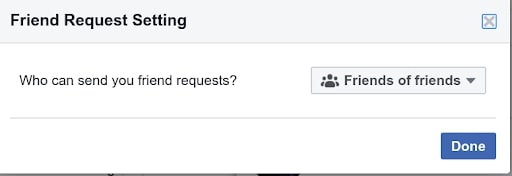
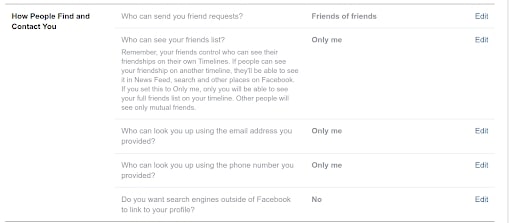
However, there are some things you can do to make it difficult for people to find you—and even minimize the chance they will send you friend requests.
If that’s your goal, we would recommend:
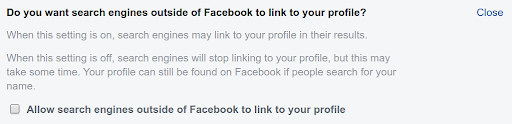
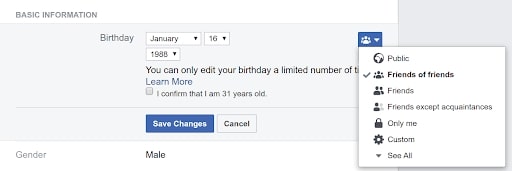
If you want to lock your Facebook profile down even further you could consider:
There’s no reason to panic as a result of the Facebook data breach. However, it is a good idea to be aware of what personal information you are exposing on Facebook — and to always keep your own copy of any data stored there. Follow our tips to keep safe and avoid falling victim to any future breaches that might happen.
Top10.com's editorial staff is a professional team of editors and writers with dozens of years of experience covering consumer, financial and business products and services.