Last Updated: May 2026






Why Your Business Needs Live Chat Software
- Increasing Sales
∙ Streamlined client contact boosts sales.
∙ Collaborative tools helps salespeople close the deal. - Improving Customer Retention
∙ Effective feedback logging keeps customers around longer.
∙ Integrated “360 degree” views of customer data help you serve them more effectively. - Streamlining Your Sales Funnel
∙ A CRM makes it easy to visualize your funnel.
∙ Granular reporting helps identify pipeline weak points. - Easy Online Marketing Tools
∙ CRMs help marketers plan and track email campaigns.
∙ Easily integrate sales and marketing data for better results and a higher conversion rate.
How to Choose the Right Live Chat Software for Your Business
- Setup Time
∙ Cloud-hosted solutions can be deployed faster than on-premises ones.
∙ Look for a CRM with good support and a large user community to easily resolve setup difficulties. - Ease of Use
∙ Many CRMs put a strong emphasis on ease of use.
∙ Find a tool with good data visualization and that provides streamlined apps to help your salespeople enter and access data on the go. - Price
∙ Most CRMs offer a free trial, to help your team evaluate the tool at no cost. CRMs range in price from “free” to “high-ticket enterprise sales”; find one that works within your budget. - Add-ons
∙ What does the CRM offer besides lead capture and outreach? Consider looking for a tool with a rich integration library to take advantage of connections with other services you may use. - Customer Service
∙ What hours is the support team available? Look for a support team accessible in your time zone and which provides more than simple ticket support. - Interface
∙ Is the CRM you’re considering visually pleasing? Opt for a tool that makes it easy for your salespeople to visualize their diary and priority appointments.
Our Top 3 Picks
- 1
 Exceptional9.7
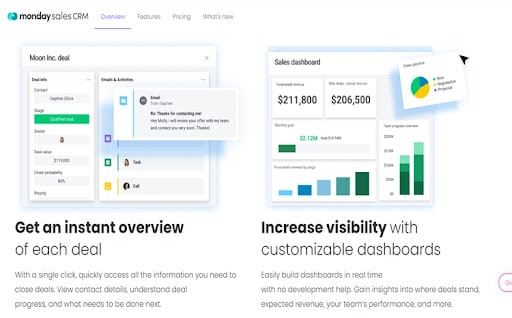 Customizable CRM option for businesses
 Free TrialRead monday CRM Review
Great for - Visual thinkers
Price - $8 per seat per month (3 seat minimum)
Free trial - 14 days
Monday sales CRM manages to provide a wealth of CRM features without overloading the user. Its visually stunning interface is remarkably accessible, with automated workflows and easy-to-use collaboration features. But there’s more underneath the surface, making it surprisingly capable both for those who only utilize its core features as well as those who need more advanced tools.
From small businesses to enterprise organizations, monday sales CRM offers an approachable, scalable CRM that can adapt to almost every user’s needs.
monday CRM Pros & Cons
PROS
Team tracking and insightsCustomizable featuresUnlimited contactsCONS
Plans require you to pay for a minimum number of seatsTraining on CRM implementation may be inadequate - 2
 Good8.4
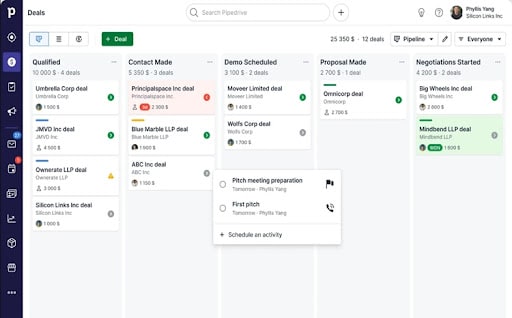 All-purpose CRM to support businesses
 Free TrialRead Pipedrive Review
Great for - First-time CRM users
Price - Starting at $14.90
Free trial - 14 days
Another accessible CRM tool, Pipedrive fills in the gaps left by Monday and other competitors in its field, namely with lead-tracking and other sales-based reporting tools.
Pipedrive offers a simple yet sophisticated interface that more than makes up for it with its ability to represent the sales process in graphic form. It is a worthy tool for keeping track of contacts, improving communication both within and outside of the team, and keeping close tabs on sales and possible deals. Add in automated call tracking, a popular chatbot feature, and a ready-to-use platform, and you have a CRM tool that offers a solution to most of the needs of small- to medium-sized businesses.
Pipedrive Pros & Cons
PROS
Free trial available for 14 daysComprehensive customer supportExtensive features plus apps and integrationsCONS
Live chat only available for paying customersAdditional costs when you add more integrations - 3
 Very good8.6
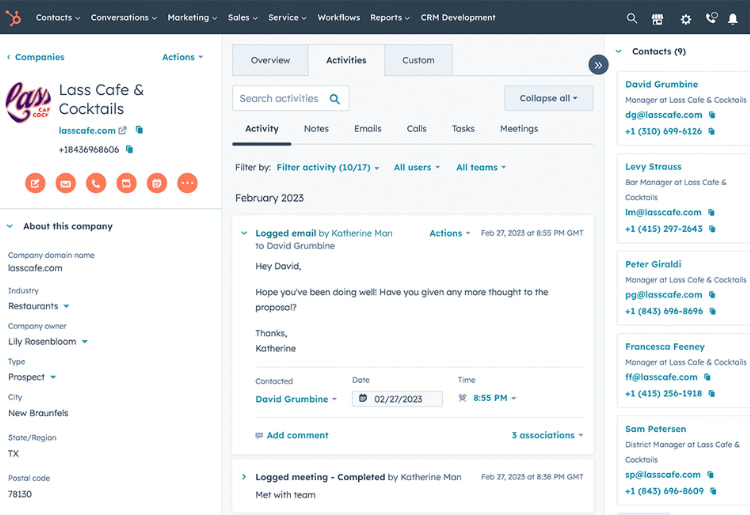 Free CRM for startups and small businessesFree CRM for startups and small businessesRead HubSpot Review
HubSpot’s CRM software is free and therefore best suited to small businesses that only need the core essentials. That said, it’s earned high reviews and offers a solid line-up of tools that make it worth considering for SMBs looking to increase sales.
HubSpot CRM has a clean dashboard that lets you sort deals and track all pertinent information which can be sorted by lead status, name, amount, or by custom filters, all so businesses can view their sales funnel in real-time. The software syncs up with Gmail and Outlook and includes tons of free communications tools such as live chat, cross-team emails, and a central inbox for sales, marketing, and customer service teams to manage conversations.
Most notably, HubSpot allows an unlimited amount of users and storage that can reach up to a million contacts. While limited for clients with advanced needs, HubSpot exceeds what you’d expect for free software and is a capable solution for small businesses looking to improve organization and productivity.
HubSpot Pros & Cons
PROS
Free CRMUnlimited users1160 app integrationsCONS
Advanced features only in the premium versionsCostly premium options



Top10.com Total Score
Our product scores consist of a combination of the following 3 components:
Popularity
Top10.com measures user engagement based on the number of clicks each listed brand received in the past 7 days. The number of clicks to each brand will be measured against other brands listed in the same query. Therefore, the higher the share of clicks a brand receives in any specific query, the higher the Click Trend Score. Top10.com accepts advertising compensation from companies, which impacts their (and/or their products’) position, and in some cases, may also affect their Click Trend Score.
Brand Reputation
Semrush is a trusted and comprehensive tool that offers insights about online visibility and performance. The Top10.com Total Score will consist of the brand's reputation from Semrush. The brand reputation is based on Semrush's analysis of clickstream data, which includes user behavior, search patterns, and engagement, to accurately measure each brand's prominence, credibility, and trustworthiness. If a brand does not have a Semrush score, the Top10.com Total Score will be based solely on the Click Trend Score and Products & Features Score (read below).
Features & Benefits
Top10.com editorial team researches and reviews financial products based on factors such as: range of products and services offered, ease-of-use, online accessibility, customer service, special awards, and more. Each brand is then given a score based on the offerings in each parameter. The specific parameters which we use to evaluate the score of each product can be found on its review page.
Editorial Reviews


9 Ways a CRM Tool Can Increase Your Sales
Jun 17, 2022
Top 10 Historical Sales Tactics That You Wouldn't Believe Actually Worked
Jun 17, 2022
How Much Should a CRM cost?
Jun 17, 2022


