Last Updated: May 2026
Best Gantt Chart Software Solutions of 2026
Visual solutions for workflow efficiency


.20210527084730.png)
 Free Trial
“The workflow management tools on Monday.com are as user-friendly as possible. “ (Jan 2026)
Free Trial“The workflow management tools on Monday.com are as user-friendly as possible. “ (Jan 2026)
A Gantt chart is a visual display of assignments and projects within a given timeframe. These charts come in bar graph/calendar presentation for a clear view. Gantt charts let you assign tasks to various team members and fit them into a timeframe for completion. What's more, they help businesses stay on target for deadlines, reassign tasks accordingly, and stay on top of projects from task to task and week to week.
Of course, a Gantt chart isn't the only way to present your project details. No doubt you've heard of project management tools like Kanban, timeline, and PERT charts. So, how do Gantt charts hold up against these other options? Well, Kanban is easy to work with, easy to change, and details tasks. However, it lacks the vital timeframe aspect of a scheduling tool and is a little too free with the change allowance within the project mainframe.
PERT charts are also wonderful for setting up projects. They're organized and comprehensive. But PERTs don't allow you to follow progress, create task dependencies, or see milestones within your bigger project. Timelines are golden for organizing, you guessed it, your project timeline. It'll give you the planned time, actual time, and forecasted time for a project. This is useful but certainly falls short without basic tools like budgeting, dependencies, and responsibilities.
We could keep going, but we think you get the point. Gantt charts are the only organizational tool that allows you to plan, delegate, chart, and forecast projects from start to finish. It delivers the information in a clear and easy to view display, and, with the right tool, Gantt charts are simple to use. While the other options offer benefits in individual areas, Gantt charts deliver efficiency and productivity from one end to the next.
Now that you're on board the Gantt chart freight train, it's time to go shopping! Before you sign up for anything, make sure your Gantt chart provider offers these important features:
Drag-and-drop makes it a breeze to add and edit your charts. You simply move an item from one area or task list to another for instant updates. This is important for you if you don't want to spend hours manually updating or editing your lists.
Because a Gantt chart is all about visual appeal, you'll appreciate the clear, understandable organization of a color-coded task list.
This feature helps you avoid going off schedule or missing a deadline because someone dropped the ball.
Milestones help you stay on track and keep employees motivated.
One of the most important features, team collaboration, keeps everyone on the same page. It also allows you to communicate with one another with ease.
Staying on top of your team is a constant strain on any manager. Gantt charts make that task a lot more manageable. They provide team leaders, managers, and employers with powerful tools like pre-fab templates, customization, color-coded task managers, tailored dashboards, multiple views, and fast and easy snapshots for tracking progress. Go Gantt, and get organized with ease.
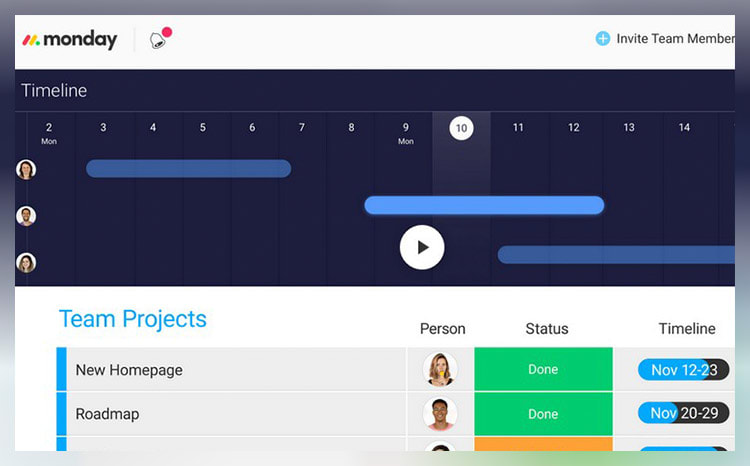
monday.com unifies your team’s tasks and processes into one user-friendly and visually pleasing interface.
As a work operating system, monday.com gives teams a clear view of responsibilities and deadlines, boosting transparency, accountability, and resource management. It features over 200 templates that can be customized with 20+ column options and various integrated apps. These tools simplify project setup and save time, helping you work more efficiently.
Additionally, you can tailor dashboards to provide detailed, team-specific views of tasks, project progression, and upcoming deadlines to enhance your team’s workflow clarity. Samyuktha Shivakumar, Global Marketing Operations Manager at Thoughtworks, reinforces this, stating that monday.com enables them “to budget the team’s time and efforts much more scientifically.”
Why we chose to review monday.com: monday.com tops our list for its combination of power, flexibility, and user-friendly design, making it ideal for even the most complex projects. It lets you seamlessly import data from spreadsheets and integrate it with your existing tools, eliminating manual data entry and freeing up time for other priorities.
Our experience: monday.com lets me implement processes that would’ve previously taken days or weeks within a few minutes. The platform’s communication tools, such as document sharing, comment annotation, and direct communication with task managers, improve collaboration within my team. The platform allows for excellent transparency for task management through easy-to-use sorting and color-coding methods.

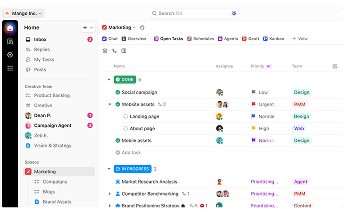
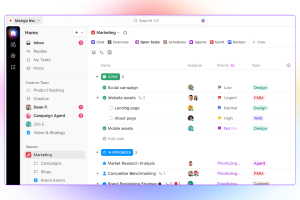
ClickUp stands out with its diverse visualization tools, including Gantt charts, mind maps, and Kanban boards, which suit various project management styles.
These features make it easy to track tasks, monitor progress, and identify challenges.
The "Timeline View" offers a clear, linear way to plan schedules and create visual roadmaps. You can group tasks by assignee, priority, tags, custom fields, and more, allowing for a flexible and organized workflow. ClickUp also boosts team visibility with the "Pulse ClickApp," which shows who's online and their current tasks. Its global timer lets you track time automatically or manually, syncing seamlessly with your desktop, mobile, or browser.
Why we chose to review ClickUp: What sets ClickUp apart is its seamless integration with over 1,000 other apps, including Slack, GitLab, GitHub, and Webhooks. This capability makes it a go-to choice for development teams, allowing them to streamline their existing workflows.
Our experience: While trying out ClickUp, I was particularly impressed with ClickUp’s unique features, such as notepads, time tracking software, goal-setting tools, and pre-made templates. I also liked that I could use slash commands (typing “/” in any text field to trigger a command menu) to assign tasks, set due dates, or create subtasks quicker.


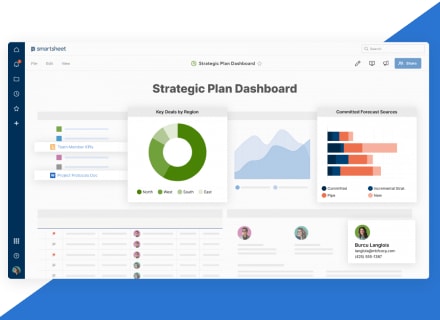
Smartsheet is a cloud-based work management platform that allows teams to manage dynamic work regardless of their location. With all data stored on the cloud and updated in real-time, you can track progress, identify potential issues early, and make data-driven decisions quickly.
This tool is also very user-friendly. A testament to Smartsheet’s ease of use comes from Janina Hill, Marketing Program Manager at WebEx, who notes, “Everybody has different levels of Smartsheet skills. But with drag and drop, all solutions are easy to use. Also, the workflow is much smoother when all processes are automated, and all information is in one place.”
This single-platform solution fosters interconnectivity across the entire organization, letting you share sheets with team members and effectively collaborate on projects. By centralizing data, it also reduces time spent on information management, boosting efficiency and enabling your team to focus on their primary responsibilities.
Why we chose Smartsheet: Smartsheet’s spreadsheet-like interface allows you to add new rows and columns as your project grows. This functionality can help you seamlessly expand small tasks into enterprise-wide initiatives. Additionally, its integration with apps like Slack, Teams, and Jira consolidates your data onto a single platform.
Our experience: Smartsheet allowed my team to strategically plan, implement, and monitor work on a large scale. This led to more streamlined processes, fostered innovation, and positively impacted overall business results within our own context. I found it invaluable in effectively navigating the complexities of today’s ever-changing work landscape.

.20210527085313.png)


