


10 Reasons TV Streaming Is Worth It
Jul 03, 2026
Why You Should Bundle Your TV Streaming Services
Jul 03, 2026
Top 10 Best Sports Streaming Services & Websites in 2026
Jul 03, 2026

Born from the fusion of HBO Max and Discovery+, Max is a versatile and expansive streaming service. Ideal for viewers who crave a blend of classic HBO shows, new originals, live news, sports, and more, it offers a wealth of entertainment options.
Max provides a semi-live TV experience, allowing streaming of new episodes as they air on cable channels. This contrasts with most video streaming services like Netflix, which only offer on-demand content.
Max's standout feature is its massive and diverse content library, boasting over 35,000 hours of entertainment. Max caters to virtually all preferences, offering everything from intense dramas to light-hearted comedies.
Max includes 24/7 access to live news under the CNN Max section and live sports through agreements with major leagues like the NHL and NBA.
Max offers an Ultimate Ad-Free plan that includes 4K UHD with Dolby Atmos on select titles. This means you can enjoy your favorite movies and shows with stunning visual and sound quality.
Max also offers robust parental control tools and the ability to create multiple user profiles. This is particularly beneficial for families since it allows parents to manage what content their children can access. The profile management system ensures a personalized experience for each user.
User reviews on platforms like Trustpilot are a mixed bag. While most praise Max for its vast content library and user-friendly interface, others point out occasional technical glitches and customer service issues. However, these negative experiences don't seem to be widespread, indicating that they might be isolated incidents rather than systemic problems.
Max's parent company, Warner Bros. Discovery, is a well-established entity in the entertainment industry, which lends credibility and a sense of reliability to the service.
There are several ways to sign up for Max – through a third-party service provider, by subscribing to Max through the Max.com website, or by signing up for Max through a supported device.
Available third-party providers include Amazon Prime, AT&T Wireless, Cox, Cricket, and DIRECTV. Each of these has its own signup process outlined by Max. However, it typically just involves selecting Max from a list and choosing Subscribe to add it to your plan.
Signing up through the Max.com website is pretty straightforward. Select a subscription plan, create an account using your email and password, and enter your payment details.
Another option is to install Max on a supported device, then sign up and subscribe using your device. Once you’ve installed the Max app on your device, the sign-up process is typically the same as signing up through the Max.com website.
Max's user interface is sleek and intuitive. Embracing a modern aesthetic, it features a dark theme with blue and white accents, which is easy on the eyes for lengthy viewing sessions. Navigating through the service is a breeze thanks to its well-organized layout. The top menu is straightforward, dividing content into categories like Home, Series, Movies, HBO, and New & Notable. This organization makes finding specific titles or exploring new content easy
Max is accessible on a wide range of devices, ensuring that you can enjoy its content from almost any location. Here's a breakdown:
Max offers a lot of different types of content:
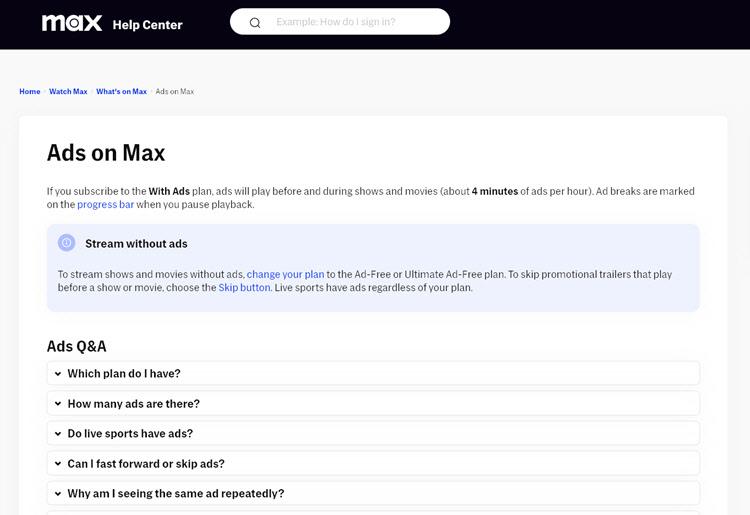
Max has a customer help center with around 300 FAQ pages. These are well arranged and easy to navigate.
To speak with a human, you’ll first need to talk to an automated chatbot. This does tend to send you around in circles for a while, but finally, you’ll be given the option of text, phone, or email support. There’s no live chat support.
I’ve found Max’s email support to be unresponsive. I sent an email with some basic queries, but despite receiving a confirmation email that my query was received, a week passed without receving a reply.
To cancel a max subscription, log into your Max account, go to the Billing section, and select the option to cancel your subscription. You'll be asked to confirm your decision, and once confirmed, your subscription will not renew at the end of your current billing cycle.
Max offers a mobile app for both Android and iOS devices. The app mirrors the functionality and design of the web interface, providing a seamless experience between devices.
You can stream your favorite shows and movies, download content for offline viewing (on the ad-free tiers), and manage your account and profile settings.
I found that the app performs well, with minimal lag and intuitive navigation, making it convenient for on-the-go streaming.
Max's pricing strategy is tier-based, offering different levels of access and features. You can choose to pay monthly or annually.
| With Ads (Best for Budget-Friendly Access) | Ad-Free (Best for Uninterrupted Viewing) | Ultimate Ad-Free (Best for Premium Experience) | |
|---|---|---|---|
Cost Per Month | $9.99 | $15.99 | $19.99 |
Cost Per Year | $99.99 (16% savings) | $149.99 (over 20% savings) | $199.99 (over 16% savings) |
Streaming Quality | Full HD 1080p | Full HD 1080p | 4K UHD with Dolby Atmos on select titles |
Concurrent Streams | 2 devices | 2 devices | 4 devices |
Offline Downloads | Not available | 30 downloads | 100 downloads |
Ad Experience | Ads included | No ads | No ads |
Live News and Sports | Included | Included | Included |
The With Ads Plan is ideal for those who don't mind ads and are looking for affordability. The Ad-Free Plan is suitable for viewers who prefer uninterrupted viewing and offline downloads. The Ultimate Ad-Free Plan is tailored for those seeking the highest quality experience with more device accessibility and 4K content.
Max's entry-level pricing is a bit higher than competitors like Netflix, Hulu, and Disney+, but I think it’s justified by its extensive library and quality of content.
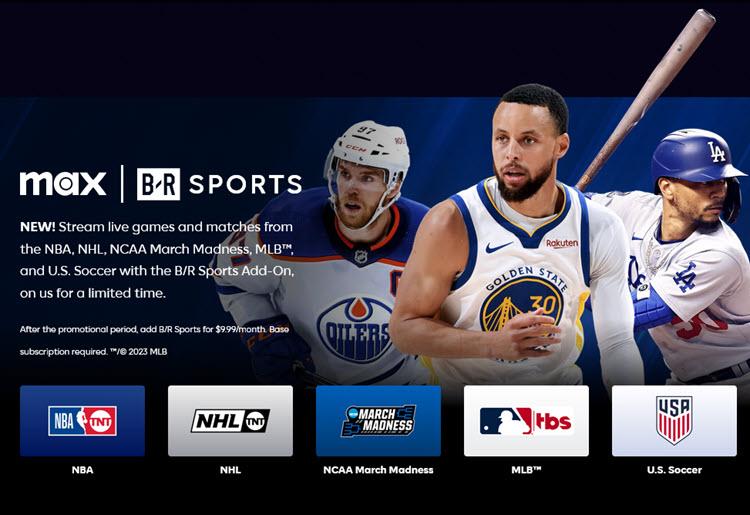
At the moment, Max subscriptions include B/R Sports. This is an add-on that includes NBA, NHL, MLB, and US soccer live games, among other sports events. After February 29, 2024, this will cost an extra $9.99 per month.
| Max | Sling TV | Hulu | Disney+ | |
|---|---|---|---|---|
Price | $9.99 - $19.99 per month | $40 - $60 per month | $7.99 - $89.99 per month | $7.99 - $13.99 per month |
Number of Devices | 2 - 4 | 1 - 4 | 2 - 5 | 1-4 |
Mobile App | Yes | Yes | Yes | Yes |
Live TV Channels | Yes | Yes | Yes | No |
Original Content | Yes | No | Yes | Yes |
Free Trial Length | None | 7 days | 30 days | 7 days |
Number of Titles | 3,400+ | 41,000+ | 2,700+ | 1,900+ |
Max and Sling TV cater to different viewing preferences. Max, with its extensive HBO and Discovery+ catalog, is ideal for those seeking premium shows, movies, and live sports. Sling TV, on the other hand, is a more traditional cable alternative, offering a wider variety of live channels.
Max and Hulu offer distinct experiences. Max excels with its vast library of HBO originals, Warner Bros. films, and live sports. Hulu, however, offers a mix of original content, a wide range of TV shows and movies, and live TV options on its higher-tier plan.
Choosing between Max and Disney+ depends on content preference. Max provides a diverse range of adult-focused content, including HBO originals and live sports. Disney+, known for its family-friendly content, includes Disney classics, Marvel, Star Wars, and Pixar films.
Max, with its extensive library of HBO originals, Warner Bros. movies, and Discovery+ reality shows, offers a rich and diverse viewing experience. Its high-quality content, including live news and sports, makes it a valuable service. The lack of offline downloads on the ad-supported tier is a drawback, but for those who value premium content and variety, Max is undoubtedly worth considering.
Top10.com's editorial staff is a professional team of editors and writers with dozens of years of experience covering consumer, financial and business products and services.