Last Updated: Oct 2026
.20210527084730.png)

Did you know?
Project management software saves the average employee 498 hrs/year (SaasList)
.20210527085313.png)

Why Do I Need A Project Management Tool For My Marketing Tasks?
If you’re involved in coordinating marketing management for your department, then you may have been looking for a tool to help you keep track of who’s responsible for what. A project management tool is the ideal software for making sure that all your marketing resources are kept on track and up to speed with project delivery. Here’s what to look for in your next—or your first—marketing project management software.
Editorial Calendar Creation
If your team is engaging in inbound marketing and producing content, then you’ll want to develop an editorial calendar to make sure that you have a cohesive plan for the content that your team is going to be producing over the coming quarter. Many marketing project management tools support content calendar creation, allowing digital marketing managers to plan and execute their content marketing efforts throughout the year. If your team needs a social media editorial calendar as well as one for general marketing activity, then this should be no problem. Many of today’s best softwares in this category allow unlimited charting and editorial calendar creation.
Centralized Communication Repository
Marketing project management tools will typically feature real time collaboration tools allowing team members to keep communication in one place and see what everybody on the team is doing. File sharing and real time chat are common add-ons allowing users to upload documentation to the project rather than sharing email attachments. Whether your marketing team is involved in event planning or lining up the latest SEO campaign, when team members annotate projects instead of sharing emails and Slack messages, it’s easier to see who is doing what—in real time. Your digital marketing project manager will thank you.
Dependency Management
If your event coordinator is unavailable due to a commitment, what’s going to happen to the project? These kinds of deliberations can be eliminated thanks to marketing project management tools. Many kinds of marketing project management software allow users to create complex project management charts with built-in logic which can calculate dependencies and map out critical paths to project completion. Many softwares also allow users to create formal project management charts such as Gantt charts. These can provide visual overviews of what tasks are going to happen to bring a project to completion—and when.
Easy Scheduling
Sometimes the very act of assigning tasks to your different in-house marketing resources can be time-consuming—not to mention freelancers and consultants. With a formalized marketing project management system, assigning tasks to a resource can be as easy as tagging them on a project and assigning a due date. Most software in this category will send an email notification to the team member informing them that they have been assigned work—alongside any details needed to bring the task to completion.
It Could Save You Money
Sure, signing up for a marketing project management tool is likely going to cost you a monthly subscription fee. But have you worked out how much not having your resources know what they’re supposed to be doing is costing your organization every year? Project management software is a wise investment—particularly for marketing teams where priorities can quickly change and the workflow is quick and agile. Rather than see it as money spent increasing corporate bureaucracy, look to the spend as an investment in the efficiency and productivity of your team.
Better Budget Control
If your marketing team is running on a tight budget, then you need to make sure that your resources operate within the budgetary parameters that they have been given. Many marketing project management tools also include functionalities to track project spend. Some even allow resources to upload receipts so that spend is constantly updated and remaining budget is computed as transactions are posted. All these features can make it substantially easier to come in on time, on spec, and on budget.
Transparency Breeds Morale
If your SEO person has no idea what the content guy does and vice versa, then you might find that a project management system is what your organization needs to finally get your team members on the same page about the work they are doing. By pooling all marketing management resources into one online login area, it’s easy for each sub-section of your marketing team to see what the other is doing. Better transparency breaks down silos. And besides—it’s good to know what the person you share a desk with actually does.
Quick and Easy Reporting
Need to present management with a high level overview of how marketing is doing to reach its end of quarter targets? With project management tools, it’s generally easy to create and edit dashboards and generate reports. KPI tracking can also often be included so that it’s easy to measure performance of key marketing resources against predefined targets.
Our Top 3 Picks
- 1
 Exceptional9.8
 Efficient resource management tool
- Price - From $27/month ($9/user/month)
- Team collaboration tools - Collaborative docs, updates, Zoom integration, whiteboards
- Free trial - 14 days
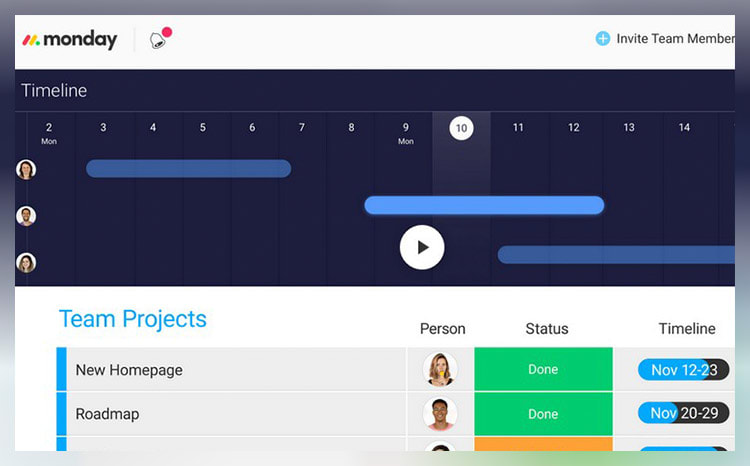
Efficient resource management toolRead monday.com Reviewmonday.com unifies your team’s tasks and processes into one user-friendly and visually pleasing interface.
As a work operating system, monday.com gives teams a clear view of responsibilities and deadlines, boosting transparency, accountability, and resource management. It features over 200 templates that can be customized with 20+ column options and various integrated apps. These tools simplify project setup and save time, helping you work more efficiently.
Additionally, you can tailor dashboards to provide detailed, team-specific views of tasks, project progression, and upcoming deadlines to enhance your team’s workflow clarity. Samyuktha Shivakumar, Global Marketing Operations Manager at Thoughtworks, reinforces this, stating that monday.com enables them “to budget the team’s time and efforts much more scientifically.”
Why we chose to review monday.com: monday.com tops our list for its combination of power, flexibility, and user-friendly design, making it ideal for even the most complex projects. It lets you seamlessly import data from spreadsheets and integrate it with your existing tools, eliminating manual data entry and freeing up time for other priorities.
Our experience: monday.com lets me implement processes that would’ve previously taken days or weeks within a few minutes. The platform’s communication tools, such as document sharing, comment annotation, and direct communication with task managers, improve collaboration within my team. The platform allows for excellent transparency for task management through easy-to-use sorting and color-coding methods.
monday.com Pros & Cons
PROS
Color-rich interface for improved organization and coordinationRobust list of supported, third-party integrationsDrag and drop project charting and timeline constructCONS
Pricing structure is fragmented and unclearCertain features (Gantt charts, timelines, etc.) are paywalled by higher-tier plans - 2
 Excellent9.3
 Visualize tasks and integrate apps
- Price - From $7/month/user
- Team collaboration tools - Collaborative docs, real-time chat, file sharing, proofing
- Free trial - Free plan available
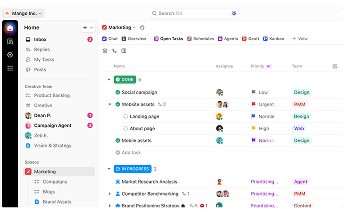
Visualize tasks and integrate appsRead ClickUp ReviewClickUp stands out with its diverse visualization tools, including Gantt charts, mind maps, and Kanban boards, which suit various project management styles.
These features make it easy to track tasks, monitor progress, and identify challenges.
The "Timeline View" offers a clear, linear way to plan schedules and create visual roadmaps. You can group tasks by assignee, priority, tags, custom fields, and more, allowing for a flexible and organized workflow. ClickUp also boosts team visibility with the "Pulse ClickApp," which shows who's online and their current tasks. Its global timer lets you track time automatically or manually, syncing seamlessly with your desktop, mobile, or browser.
Why we chose to review ClickUp: What sets ClickUp apart is its seamless integration with over 1,000 other apps, including Slack, GitLab, GitHub, and Webhooks. This capability makes it a go-to choice for development teams, allowing them to streamline their existing workflows.
Our experience: While trying out ClickUp, I was particularly impressed with ClickUp’s unique features, such as notepads, time tracking software, goal-setting tools, and pre-made templates. I also liked that I could use slash commands (typing “/” in any text field to trigger a command menu) to assign tasks, set due dates, or create subtasks quicker.
ClickUp Pros & Cons
PROS
AI CompatibleCan integrate with over 1,000 appsOffers numerous project tracking toolsCONS
Extensive feature list can be overwhelming for new usersSteep learning curve for beginners - 3
 Good8.3
 Includes pre-made to-do lists
- Price - From $50/month
- Team collaboration tools - Email integration, shared inbox, real-time chat, file sharing
- Free trial - Free plan available
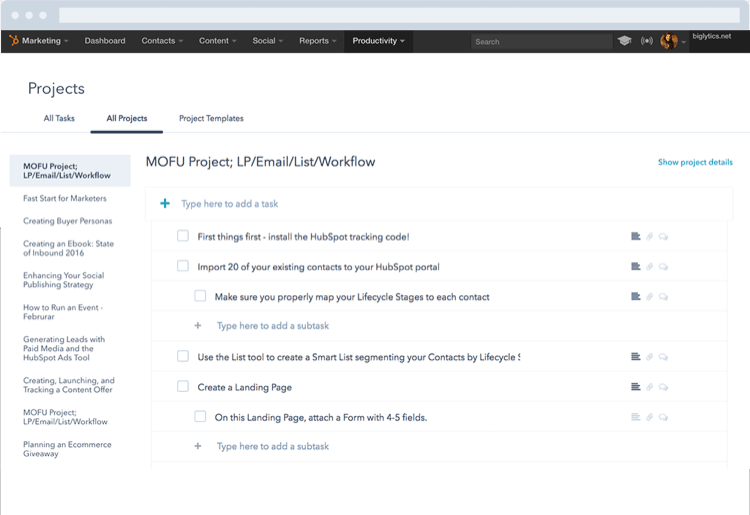
Includes pre-made to-do listsRead HubSpot ReviewYou can use HubSpot to enhance team coordination via structured lists. This platform lets you create and assign tasks, add subtasks, and set due dates from the same tab. You can also tag team members, leave comments and attach files inside projects for improved communication and collaboration.
While HubSpot may not have advanced tools like Gantt charts or detailed time-tracking, it provides a reliable foundation for managing tasks. For example, its real-time dashboard offers critical insights into project timelines, team workloads, and individual performance.
You can use this data during one-on-ones to identify potential hold-ups. It can also help you to delegate work more effectively. You can even tailor your dashboard view according to your team’s specific needs for a more personalized project management experience.
Why we chose HubSpot: This platform offers prebuilt project templates to help sales and marketing teams with tasks like launching sales campaigns and creating email newsletters. Each template comes with predefined action steps and best practice guidelines. These templates can save time and ensure everyone has clear instructions on what needs to be done.
Our experience: HubSpot’s features were easy to use and understand, even for our team members with limited technical know-how. Its seamless integration with HubSpot’s CRM also created a unified work environment for all our departments. Plus, being able to sync it with my calendar made it easy to know when to work on tasks and when to prepare for meetings.
HubSpot Pros & Cons
PROS
Customizable real-time dashboardOffers prebuilt project templatesIntegration with other HubSpot productsCONS
Smaller enterprises might find HubSpot's premium pricing costlyLacks more advanced project scheduling software



37,788 people
visited a project management software this month

Top10.com Total Score
Our product scores consist of a combination of the following 3 components:
Popularity
Top10.com measures user engagement based on the number of clicks each listed brand received in the past 7 days. The number of clicks to each brand will be measured against other brands listed in the same query. Therefore, the higher the share of clicks a brand receives in any specific query, the higher the Click Trend Score. Top10.com accepts advertising compensation from companies, which impacts their (and/or their products’) position, and in some cases, may also affect their Click Trend Score.
Brand Reputation
Semrush is a trusted and comprehensive tool that offers insights about online visibility and performance. The Top10.com Total Score will consist of the brand's reputation from Semrush. The brand reputation is based on Semrush's analysis of clickstream data, which includes user behavior, search patterns, and engagement, to accurately measure each brand's prominence, credibility, and trustworthiness. If a brand does not have a Semrush score, the Top10.com Total Score will be based solely on the Click Trend Score and Products & Features Score (read below).
Features & Benefits
Top10.com editorial team researches and reviews financial products based on factors such as: range of products and services offered, ease-of-use, online accessibility, customer service, special awards, and more. Each brand is then given a score based on the offerings in each parameter. The specific parameters which we use to evaluate the score of each product can be found on its review page.
Editorial Reviews

Smartsheet Alternatives: 5 Similar Options for Project and Task Management
Jun 23, 2026
Wrike Alternatives: 5 Best Project Management Software to Try in 2026
Dec 15, 2025
Asana Alternatives: 5 Best Project Management Software to Try in 2026
Dec 15, 2025


