Last Updated: May 2026
1
Award Winning Service

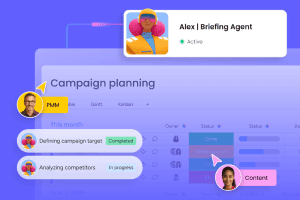
monday.com Agents
 Free Trial
Build and deploy AI agents for real work on one secure AI work platform
- No-code AI agent builder for business teams
- Connects agents to boards, tools, and knowledge
- Scoped permissions, logs, and human oversight
- Unlimited time on Free plan, no commitment
9.8
Exceptional


Award Winning Service
 Frequently Asked Questions
What is AI in Project Management?
AI in project management involves using machine learning, natural language processing, and other AI technologies to automate administrative work, generate insights, optimize resource allocation, and streamline workflows for better productivity and transparency.
Will AI replace project managers?
AI will not replace project managers but will transform their roles into more strategic leadership positions focused on interpreting insights, guiding teams, and maximizing value from project execution.
What are the main benefits of using AI in project management?
Key benefits include efficient automation of routine tasks, improved risk management, better resource planning, enhanced collaboration, and access to real-time project insights, all contributing to faster and more predictable project delivery.
How do AI project management tools ensure data security?
Most leading tools use encryption for data both at rest and in transit, strong user authentication, multifactor authentication, and access controls to prevent unauthorized data access.
What is the future of AI in project management?
AI aims to make project delivery more predictable and value-driven through automation, strategic insights, and enhanced human-AI collaboration, with project managers leveraging AI as trusted assistants rather than replacements.
What is AI‑enhanced project management software, and why does it matter?
AI‑powered project management platforms are no longer just task trackers; they’re intelligent AI tools built to amplify productivity, collaboration, and decision‑making. Whether managing enterprise portfolios or creative workflows, leading solutions now integrate machine learning, virtual assistants, and generative AI to:
Centralise tasks, timelines, and team communications
Automate reports, status updates, and repetitive workflows with AI asking logic
Predict delays and resource bottlenecks using deep learning analytics
In today’s hybrid‑work and remote‑first world, such platforms act as foundational AI for business infrastructures and appear firmly within the AI web ecosystem.
What are our top partners’ key AI tools?
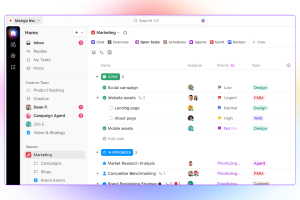
monday.com: Offers “monday AI” features, including “Sidekick” (a digital assistant), AI‑powered columns, text generation, and workflow automations. Paid plans include a limited number of AI credits monthly, while continued or heavy usage requires an additional AI add-on plan.
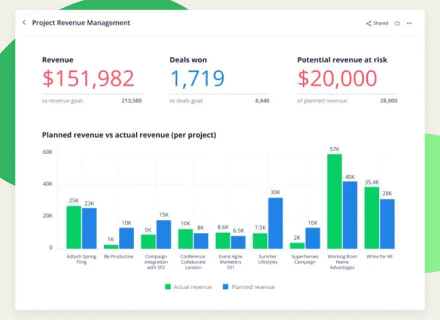
ClickUp: “ClickUp AI” (also known as Brain or ChatAgents) provides meeting intelligence (transcripts, summaries, action item detection) and productivity prompts. All users get a free trial of ClickUp AI, but ongoing access requires a paid plan and an AI add-on.
Both platforms provide free plans or trial options to explore core features and integrate with broader work ecosystems, including connections to other AI apps and services.
Compare With Top10.com, Choose the Best for You
At Top10.com, we recognize the importance of thorough and accurate product and service reviews in guiding your choices. Our team, comprising editors and industry experts, conducts extensive research to provide comprehensive insights. Our content is continually updated to reflect the latest market trends, offering current information.
We provide a range of services including comparison lists and in-depth reviews, all tailored to meet your specific needs. Our goal is to empower you to make confident and informed choices.

Why now? The 2026 landscape for AI in project management
The momentum behind AI in project management is driven by:
The need to reduce manual overhead: fewer meetings, less chasing, more value-added work
The availability of generative systems (e.g., referencing OpenAI, ChatGPT, Claude AI), which enable natural‑language interactions and summarisation
The shift in PMO (Project Management Office) roles from reporting to insight and strategy: using deep learning to flag risks, surface insights, and enable “what‑if” modelling
Growing comfort with AI web‑accessible tools that deliver on‑demand, across teams and devices
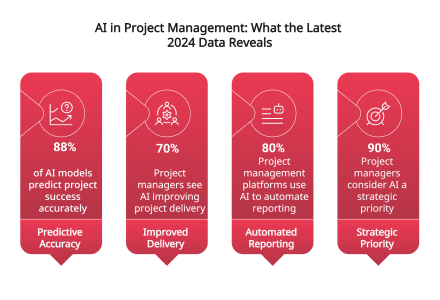
Source: gitnux.org
How to choose the right AI-powered project management tool?
When evaluating AI-enhanced PM software, focus on these core factors:
Define your must-have features (e.g., automation, predictive insights, easy reporting)
Check support for your workflow style (Agile, Kanban, Gantt, hybrid, etc.)
Review integrations with tools you already use (Slack, Zoom, Drive, etc.)
Look for user-friendly design (dashboards, drag-and-drop, mobile access)
Confirm pricing structure and upgrade flexibility for growing teams
Prioritize security, privacy, and regulatory compliance
Examine training resources, documentation, and vendor support
Read real-world reviews or case studies for reliability insights
What are the limitations or challenges of AI in project management?
While AI tools are reshaping how teams operate, they aren't magic bullets. Effective integration depends heavily on quality data, consistent updates, and clear workflows. When project data is incomplete, outdated, or siloed, even the smartest machine learning models will struggle to offer meaningful insights.
Here are a few common limitations teams may face:
AI predictions are only as accurate as the input data. Missed deadlines, unlogged updates, or vague task descriptions can skew results.
AI might surface trends, but it lacks human intuition. Strategic decisions still require people, especially in complex or political environments.
Some AI for business platforms require time and training to implement correctly. Without buy-in, teams may default to old habits.
Models may over-prioritize or underweight certain factors, especially if past data was imbalanced.
Sharing sensitive tasks or team data with AI web systems requires strict permissions, encryption, and compliance protocols.
Even with virtual assistants and generative AI generating smart outputs, human oversight remains critical. Teams should view AI as a co-pilot, not a replacement — one that excels at processing volume, but still needs guidance on judgment.
Comparing the top AI-enhanced project management tools
Below is an up-to-date snapshot of leading project management platforms, focused on what each one does best with AI, based on the latest 2026 features and user insights.
Software | Most recommended for |
|---|---|
monday.com | Best for customizable workflows with AI-powered automation and task planning |
ClickUp | Best for all-in-one productivity with AI assistants and smart documentation |
HubSpot | Best for aligning project management with CRM using AI-enhanced task flows |
Wrike | Best for enterprise-level AI project forecasting and resource optimization |
Miro | Best for AI-assisted visual collaboration and ideation workflows |
Slack | Best for integrated AI chat and real-time project updates across teams |
FreshBooks | Best for combining project tracking with AI-enhanced billing and invoicing |
Asana | Best for intuitive task tracking and AI-generated timelines and alerts |
Jira | Best for agile teams using AI to track dev sprints, bugs, and engineering ops |
Monday.com vs ClickUp
Monday.com excels with modular workflows, visual dashboards, and AI automation, making it a great fit for operational and creative teams. ClickUp embeds AI chat agents and command prompts within a unified workspace that supports content, code, and task management — ideal for teams seeking deep productivity in a single hub.
Monday.com vs HubSpot
Compared to HubSpot, Monday.com focuses on streamlined task flows and creative team execution. HubSpot, meanwhile, connects project execution to broader business processes like sales, marketing, and customer service. It leverages AI tools to surface CRM insights and manage operational workflows, offering a more integrated approach across departments.
ClickUp vs HubSpot
ClickUp leads in cross-functional team collaboration, thanks to its native AI web tools and productivity automations. HubSpot is best suited for syncing project timelines with CRM systems, automating both internal tasks and customer-facing actions. It's particularly well-suited for projects tied to marketing, sales, or onboarding where CRM alignment is critical.


