
In a Nutshell
Private Internet Access Pros & Cons
Pros
Cons
Private Internet Access at a Glance
Speed & Performance
Ease of Use
Compatibility
Pricing
Servers & Locations
Private Internet Access at a Glance
| Best for | Safe surfing, privacy, protection |
| Price Range | Starts at $2.19 per month |
| Location | 70+ countries, 10K servers |
| Netflix | Unblocks Netflix UK, US, DE and JA |
| Torrenting | P2P and torrenting allowed |
| Logging | No logging policy |
| Number of Devices | 10 |
| Operating Systems | iOS, OS, Android, PC, Linux |
| Browser Extensions | Chrome, Firefox, Opera |
Privacy
Private Internet Access has a lot of fantastic features that we'll look at in a minute. But it's real claim to fame is in its privacy and protection. The extent Private Internet Access goes to protect your identity and data is pretty impressive. Of course, this VPN has the usual military-grade WiFi encryption, but it goes a lot further than that. Private Internet Access uses multiple VPN gateways for further encryption. Private Internet Access will block ads, malware, and pernicious trackers, too. And it's even got a SOCKS5 proxy included with every plan.
Private Internet Access also supports PPTP, OpenVPN, and L2TP/IPSec, so you can have your pick of the litter when it comes to protocols. This allows you to decide the level of protection you want. But probably our favorite privacy feature to highlight is the leak tests. Private Internet Access has DNS, IPv6, and email leak tests that you can run right on the website. That’s some serious protection.
Oh, and we forgot to mention Private Internet Access’s privacy policy. This VPN service doesn’t collect any of your information. It’s a total no-logs policy, so you never have to worry about your information being passed onto anyone else because there’s no information to pass on. We also like that you can see the Private Internet Access transparency report. This is a snapshot of government demands for user data and how many requests were complied with (spoiler alert: it’s none).
Features
Private Internet Access comes fully loaded with more features than you’ll likely know what to do with. To start with, Private Internet Access offers unlimited bandwidth, so you’ll never get throttled and have to deal with buffering blues. Private Internet Access also has more than 20,000 servers to work with. So, your speed is going to be super fast and downloads smooth.
What’s more, Private Internet Access allows you up to 10 simultaneous connections with a single subscription. That’s unbelievable! There’s also a feature called Mace, something that will block domains that are used by third-party advertisers.
We also like the warning displays Private Internet Access provides. You will see a warning sign whenever you’re about to do something that can compromise your data security (like choose the no data encryption setting). There’s also ephemeral key usage, so you are really super safe.
Some other features we thought were impressive include:
- Kill switch
- DNS leak protection
- IP leak protection
- Handshake encryption
- Data authentication
- Integrated firewalls
Speed
PIA OFF
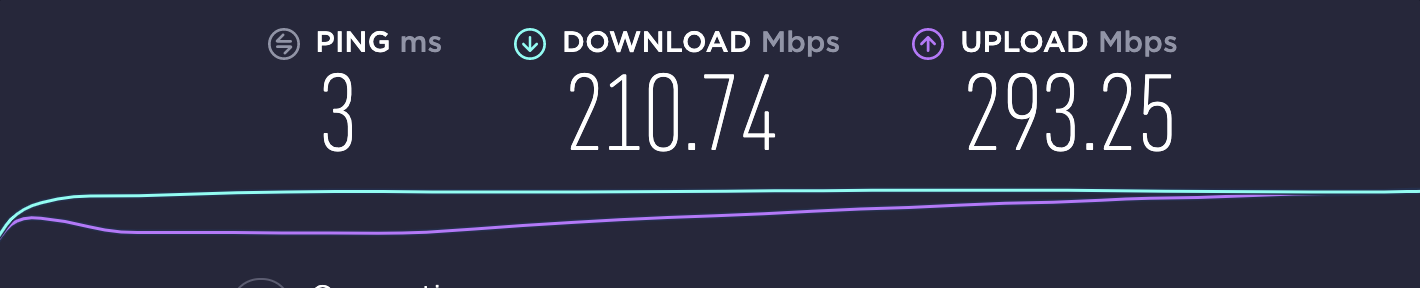
PIA ON

As you can see, Private Internet Access slows you down a little. But the amount is negligible, so most people won’t even feel the change at all.
Pricing and Deals
Private Internet Access has an expensive monthly plan. But if you choose to sign up for the 2-year plan, you save a whopping 78% and get 2 months free. So, if you're signing up for this site, it makes sense to get the 2-year plan. Here's a look at the Private Internet Access pricing plans available:
| Monthly Plan | 1-Year Plan | 3-Year Plan | |
|---|---|---|---|
| Price per month | $11.95 | $3.33 | $2.19 |
Private Internet Access also offers a risk-free 30-day money-back guarantee. If you’re not happy with the service after a week, you’ll get a full refund. Another nice thing about working with Private Internet Access is that it allows for anonymous payments. You can use gift cards like Starbucks, Walmart, and Best Buy cards to pay for your subscription. If you’re really into your privacy, this is a major perk.
Torrents
Private Internet Access believes in supporting open internet for all. As such, there are no restrictions on what content you can view, download, or share. Private Internet Access supports P2P torrenting, and there are even clear how-to guides on the website to show you how to do it.
Netflix
Private Internet Access allows you to stream Netflix from any of its servers. There are no dedicated Netflix servers, but since they all work relatively the same, it doesn’t make a difference either way. You can also stream Hulu and Disney+.
Client Setup
Private Internet Access has a huge selection of applications you can download, so setup is easy no matter what device you're working with. From Macs to PCs and even Linux operating systems, Private Internet Access is a quick and painless process to get started. There are even browser extensions for Chrome, Firefox, and Opera. So, you can have a 1-step setup. Private Internet Access obviously worked hard to make things as convenient and user-friendly as possible, and we give it full props for that.
Apps
Private Internet Access has a mobile app for Android and iOS devices, and your experience will be compatible across all your devices.
How Does Private Internet Access Compare?
| Private Internet Access | Bullguard | PrivateVPN | |
|---|---|---|---|
| Price | From $2.19 per month | $2.97-$7.08 | $3.82-$7.67 |
| Number of Devices | 10 | 6 | 6 |
| Number of Servers | 20,000 | 16 | 150+ |
| Best for | Maximum privacy and protection | Users who want an easy-to-use but thorough security VPN | Unlimited bandwidth and data usage (non-techy people, too) |
| P2P or Bittorrent | Yes | Yes | Yes |
Customer Support
Private Internet Access offers 24/7 customer support, something a lot of other VPNs do not. You can get in touch by submitting a support ticket or by live chat. Private Internet Access has fast response times, too.
Ease of Use
We already mentioned how easy it is to set up Private Internet Access. The interface itself is pretty simple. Click the power button to turn on your VPN, and click it again to turn it off. Plain and simple. You can even set up auto-start that will turn on the VPN whenever you connect to certain WiFi channels.
And in case you get tripped up, there’s a huge client support section to help walk you through the technical aspects of the system.
FAQs
Q: What are ephemeral keys?
A: Ephemeral keys are a type of encryption technology. The keys are randomly generated, and they are thrown out after a short time. Ephemeral keys maximize your encryption possibilities, encoding your information with the highest level of security.
Q: What can I use my VPN for?
A: Private Internet Access is used for a number of privacy and convenience features. You can use the VPN to browse online securely, stop marketers and brands from eavesdropping on your browsing, prevent leechers from grabbing your private data while on public WiFi networks, unblock geo-restricted content, hide and protect your identity, and remain anonymous online.
Bottom Line
Private Internet Access is a VPN that's been around for a decade. While it has a lot of great features we enjoyed using like the ad blocker, browser extensions, and multi-device support, Private Internet Access really blew us away with its privacy protection features. With things like AES 128 or 256, data authentication, handshake encryption, and warning displays, you can stay anonymous and browse securely no matter where you go.
 Frequently Asked Questions
Top10.com's editorial staff is a professional team of editors and writers with dozens of years of experience covering consumer, financial and business products and services.