
Is WP Engine Worth It?
WP Engine Pros & Cons
Pros
Cons
WP Engine at a Glance
Simple Setup
Technical Features
Security Features
Customer Service
Servers
Overview
WP Engine at a Glance
What is WP Engine?
WP Engine is a premium web hosting platform that is designed for people who need fast loading speeds for their WordPress site.
WordPress websites can load slowly when using certain budget web hosts as these providers have to commit energy to cater to a range of software. This leads to them having bloated interfaces where nothing runs efficiently. WP Engine solves this problem by focusing exclusively on WordPress.
You don’t get additional features like email hosting, or the freedom to install other software like Joomla or Drupal on the WP Engine. But you get fast, reliable hosting that excels at one thing— hosting WordPress sites.
WP Engine features
Developer features
WP Engine provides a staging feature that allows you to create a copy of your site for testing purposes, so you can make changes without worrying about a mistake appearing on your live website. You can also use the version control software Git to push code changes to your website securely.
Platform and location
WP Engine uses the Google Cloud Platform, allowing you to choose from data centers across North America, Europe, Asia/Pacific, and the Middle East. Google Cloud Platform is one of the major providers of cloud computing, which allows WP Engine to provide reliable hosting. You’ll usually want to choose a data location based on where your customers are located.
Speed and performance
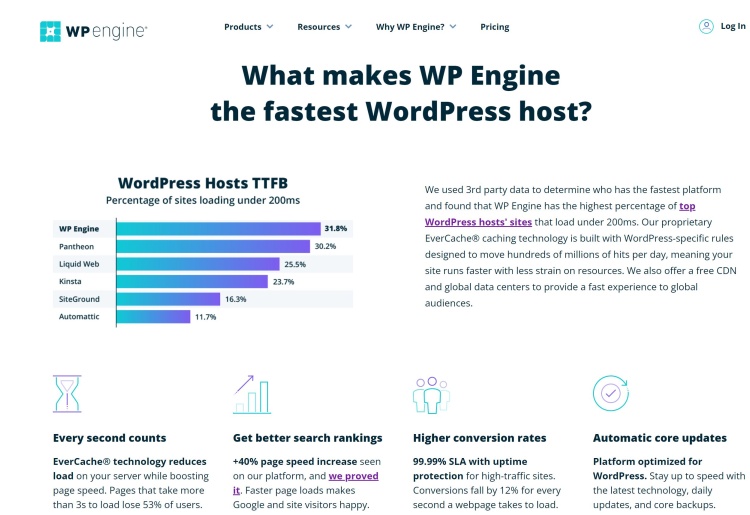
WP Engine is purpose-built for WordPress, making it one of the fastest WordPress hosts available.
Bandwidth and storage
Depending on your choice of plan, you get 50GB to 200GB of monthly bandwidth and 10GB to 20GB of storage.
Reliability and uptime
By using Cloudflare CDN and Google Cloud Platform, WP Engine provides a reliable service with over 99.95% uptime.
Control panel
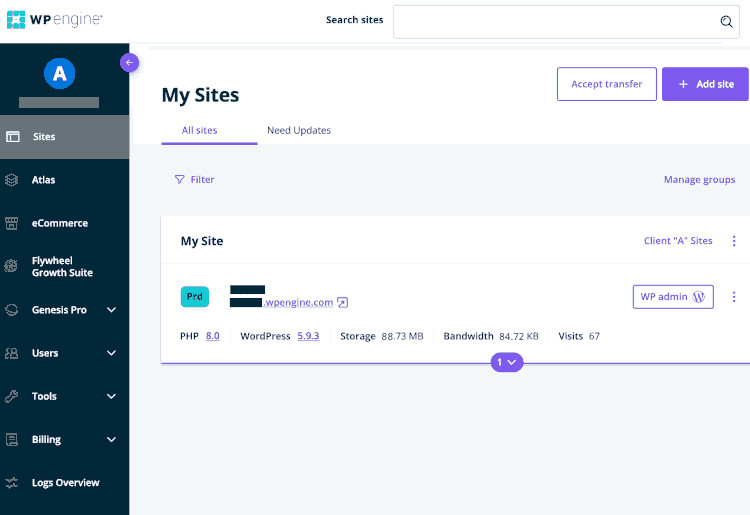
Unlike most competitors that use cPanel or Plesk as a control panel, WP Engine uses its own bespoke control panel. This means that you’re presented with a clean interface clear of clutter, and that contains only the tools available to you. I found the interface easy to use with all the tools organized in a sensible order.
Backup and recovery
WP Engine stores up to 60 days’ worth of backup checkpoints. You can also download backups as ZIP files to your local computer. I didn't experience any issues downloading and restoring from backups.
CDN support
WP Engine uses Cloudflare CDN, meaning your website is served to users around the world faster.
Is WP Engine Safe and Reliable?
WP Engine meets the SOC 2 standards for Security and Availability Trust Services Categories, making them a safe choice. SSL certificates are included in all plans and your data is backed up daily. DDoS mitigation tools come as standard and WP Engine claims to block over 26 billion cyber attacks every year. You can also pay for additional security features including automatic plugin updates and a web application firewall (WAF).
How WP Engine Works
WP Engine is a web hosting company specializing in providing a service for WordPress users. WordPress is a Content Management System (CMS) software used by millions of websites worldwide. Like any software, WordPress needs to be installed correctly and have enough resources to run. WP Engine ensures they are one of the leading WordPress hosts by focusing solely on WordPress.
WP Engine’s focus is so narrow that it does not provide email accounts or domain name registration. This adds some complexity to getting set up but has other benefits. I use separate providers for my domain name registrations, email hosting, and web hosting. This separation makes it easier to change any one provider if I am unhappy with the service or find a better deal elsewhere.
How To Get Started With WP Engine
Signing up with WP Engine is straightforward. Choose the plan you want to use, enter your details, choose a data center, and make your payment. You’ll be presented with a screen that gives you some additional information—like the WP Engine User Portal link—but this is also emailed to you.
There’s a prompt to a plugin to automatically migrate your WordPress site if you already have one. Otherwise, you can log directly into the User Portal. Your website will appear on the dashboard, under youraccountname.wpengine.com. You’ll need to register your own domain name elsewhere and configure the name servers to make your website live at yourdomain.com.
This isn’t the easiest process if you are unfamiliar with managing domains, but WP Engine provides documentation for all these steps, and there is 24/7 support available if you get stuck.
WP Engine Customer Service
WP Engine provides 24/7 live chat for all its users. I contacted the live chat and received answers to my questions from a person within 15 minutes. You’ll need to upgrade to professional or growth plans for access to phone support.
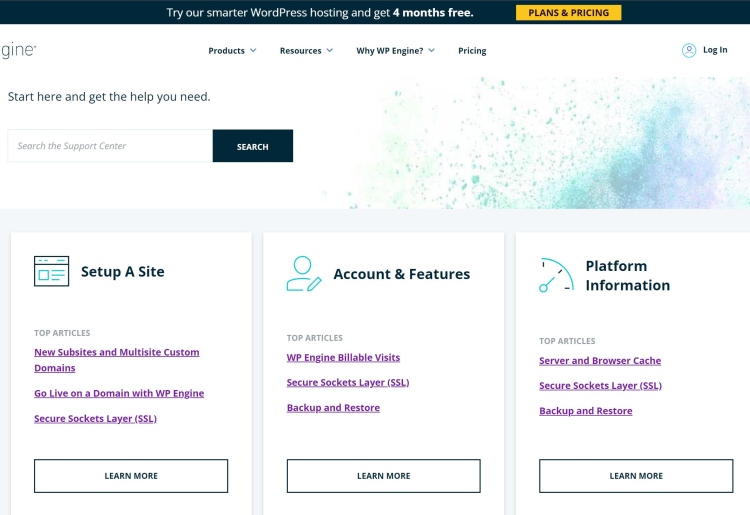
There’s also a wealth of supporting documentation in the WP Engine knowledge base. You’ll find answers on how to set up and manage your WP Engine account, as well as on using WordPress itself. For the more technically minded, there are articles such as a guide on preventing SQL injection attacks in WordPress.
How To Cancel or Pause a WP Engine Subscription
Cancelling your WP Engine subscription is straightforward. You log into your account and navigate to the billing section. Select your latest invoice, open “modify hosting plan”, and from there you can request the cancellation. WP Engine recommends that you download a backup of your website before requesting cancellation.
Is There a WP Engine App?
No, there is no WP Engine app. You’ll need to log into your account on the WP Engine website to manage your account.
WP Engine Pricing
How Much Does WP Engine Cost?
WP Engine provides a premium WordPress hosting service and charges higher fees than many alternatives. You’re also limited by the number of visitors to your site each month, with WP Engine charging $2 per 1,000 extra monthly visitors.
WP Engine provides a special offer of four months free during the 1st year of hosting when you purchase an annual package. This brings the cost of the packages down to $20-$96 per month when billed annually, which is still more expensive than many of its competitors.
| Startup | Professional | Growth | |
|---|---|---|---|
Cost per month | $30 ($20 for 1st year) | $59 ($39 for 1st year) | $115 ($77-96 for 1st year) |
Sites | 1 | 3 | 10 |
Bandwidth | 50GB | 125GB | 200GB |
Monthly Users | 25,000 | 75,000 | 100,000 |
Special offer | Four months free | Four months free | Four months free |
Uptime | 99.95% | 99.95% | 99.95% |
Website builder | WordPress only | WordPress only | WordPress only |
Money Back Guarantee | 60 days | 60 days | 60 days |
The startup plan is best for bloggers and small websites. If you don’t have much traffic to your website yet and don’t need phone support, then this is the best choice for you. The professional plan caters to small business users requiring phone support and anyone wanting to host multiple sites. Growth is a good choice if you have a growing business or manage multiple small or medium-sized projects.
What can you do with WP Engine for free?
There is no free trial version of WP Engine, although they have a 60-day money-back guarantee, so you can still try the hosting out risk-free.
Optional add-ons
You can upgrade your WP Engine with some optional add-ons.
- Additional sites: If you want to host more websites on your plan you can for an additional $17 per site/month.
- Automated plugin updates: WP Engine automatically keeps your plugins and sites up-to-date and secure for an additional $3-6 per month—depending on your chosen plan.
- Extra layer of security: Enterprise-grade SOC 2 level security with managed web application firewall (WAF) can be purchased for $15-$23 per month depending on your plan.
- Site monitoring: For an extra $4 per month, you can monitor your website status and get automatically alerted when errors are detected.
If you plan to add Ecommerce functionality to your site, you’ll want to use WP Engine’s WooCommerce plans. These cost an additional $4-16 per month—depending on your requirements.
WP Engine Alternatives
How Does WP Engine Compare to Other Hosting Brands?
| WP Engine | SiteGround | WordPress.com | Bluehost | |
|---|---|---|---|---|
Price | $20-$96 per month | $3.99-$10.69 per month | $0-45 per month | From $2.95 per month |
Bandwidth | 50-200GB per month | Unmetered | Unmetered | Unmetered |
Special offer | Four months free | Save 73% | Free Domain(1 year) | Free Domain(1 year) |
Uptime | 99.95% | 99.9% | 99.999% | 99.9% |
Website builder | WordPress only | Yes | WordPress only | Yes |
Money-back guarantee | 60 days | 30 days | 14 days | 30 days |
WP Engine vs SiteGround
SiteGround’s WordPress-optimised web hosting provides a competitive alternative to WP Engine. Both offer great performance and customer support. WP Engine has the edge when it comes to being optimized for WordPress, but SiteGround offers fantastic value for money. SiteGround’s plans are heavily discounted for the 1st year, but even excluding the discount, it’s significantly cheaper than WP Engine.
WP Engine vs WordPress.com
WordPress.com is similar to WP Engine as it provides dedicated WordPress hosting. However, WordPress.com also provides options to register your domain name and have your email hosted with them. If you only plan on having a single website, WordPress.com is the cheaper option and even has a free tier—although there are no support options with this plan.
WP Engine vs Bluehost
Bluehost is one of the largest web hosting companies. They have a long-established reputation for providing budget hosting packed with features. If you are looking to save money on your web hosting, they are a great choice. But don’t expect Bluehost to match WP Engine hosting in terms of performance. I’d also choose WP Engine over Bluehost if you think you are going to need to contact support with technical questions.
Bottom Line (Is WP Engine Worth It?)
WP Engine is a great choice if your priority is high performance for your WordPress site, but you will be paying more for this service. You’ll also need to purchase your domain name and host your email accounts elsewhere. This gives WP a higher technical barrier to getting started than its competitors on our list.
The pricing makes it expensive for hobby projects, and being limited to WordPress might be too restrictive for some. But if you need a well-managed and performant WordPress hosting service, then I’d highly recommend WP Engine.
 Frequently Asked Questions
How do I know I can trust this review?
Phillip Richardson writes for Top10.com as a tech writer with 13+ years of experience in IT. He holds a BSc in Audio and Music Technology and a PhD in Acoustics from Anglia Ruskin University. His career includes roles as Laboratory IT Manager at the University of Cambridge, Linux Engineer on a British Atlantic Survey expedition, and IT Officer at Newnham College.